WiFi Scanner: Device Detector
Stay aware of your surroundings. Device Detector turns your phone into a powerful scanning tool that helps you check for hidden cameras and suspicious devices wherever you go — hotels, rentals, gyms, restrooms, or any private space.
Using a combination of wireless network analysis, Bluetooth detection, magnetic field sensing, and infrared scanning, the app gives you practical tools to feel more confident about your privacy.
▶ KEY FEATURES
- Wi-Fi Network Scanner
Scan your current Wi-Fi network to discover connected devices. The app identifies gadgets that could potentially be network cameras or other surveillance equipment sharing your connection.
- Bluetooth Device Detection
Detect nearby Bluetooth-enabled devices in your environment. Spot unfamiliar or unnamed devices that may warrant a closer look, especially in places where you expect privacy.
- Magnetic Field Detector
Leverage your phone's magnetometer to pick up on magnetic anomalies. Hidden cameras and electronic devices often contain small magnets or components that produce detectable magnetic signatures — particularly behind walls, mirrors, or inside everyday objects.
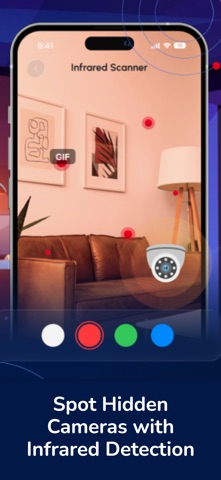
- Infrared (IR) Detector
Use your phone's camera to detect infrared light sources invisible to the naked eye. Many surveillance cameras rely on IR LEDs for night vision, and this mode helps you spot them even in complete darkness.
▶HOW TO USE
1. Pick a scan mode — Wi-Fi, Bluetooth, Magnetic, or IR
2. Move your phone slowly around the room
3. Review flagged devices and signals
4. Tap any result for details
▶WHY YOU'LL LOVE IT
All-in-one scanner — Four detection modes in a single app, no extra hardware needed
Works anywhere — Hotels, Airbnb rentals, public restrooms, offices, fitting rooms, gyms
Real-time feedback — Instant results as you scan, with clear visual and audio cues
Simple interface — No technical knowledge required, just open and scan
Travel essential — Lightweight tool you always have in your pocket when you need it most
UNLIMITED ACCESS
Upgrade to Premium to unlock all scanning modes, advanced detection features, and unlimited use with no restrictions. Subscribe and get full access to every tool Device Detector has to offer. Manage or cancel your subscription anytime in your Apple ID settings
Privacy Policy: https://www.belkalabs.com/privacy
Terms of Use: https://www.belkalabs.com/terms