Widget Maker is a paid app. A subscription or the one-time Lifetime unlock is required to use it — there is no free tier and no free trial. You choose your plan on the purchase screen the first time you open the app, and everything below is included from that moment.
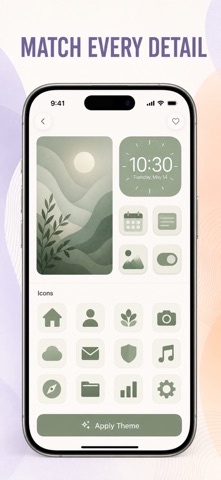
Give your iPhone a complete makeover. Matching Home Screen themes, real widgets, custom app icons and wallpapers, all in one aesthetic toolkit. Mix and match to build a look that feels like you — pastel, dark, minimal, colorful and more.
WHAT YOUR PURCHASE INCLUDES
• 3-in-1 theme packs — a coordinated widget set, icon pack and wallpaper in one tap
• Real Home & Lock Screen widgets — clock, date, calendar, weather, quotes and photos
• Widget Maker — pick a face, color and font, then preview it live before you apply
• Colorway editor — build your own palette and push it across widgets, icons and wallpaper
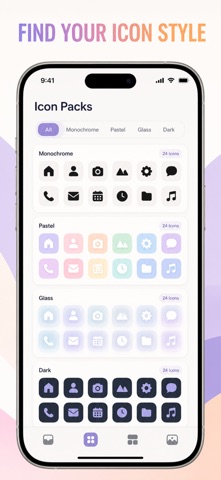
• Custom app icon packs to finish the look
• A large wallpaper library for Home and Lock Screens, plus import your own photo
• Saved Looks — keep every setup you build and switch back with one tap
HOW IT WORKS
1. Open the app, answer a few quick style questions and choose your plan
2. Browse themes, widgets, icons and wallpapers
3. Tap Apply, then add the Widget Maker widget from your Home Screen
4. Follow the built-in step-by-step guide to install your icon pack
PRICING
Weekly and yearly plans renew automatically until cancelled. The Lifetime unlock is a single payment that never renews. Prices are shown in your local currency on the purchase screen before you buy. Payment is charged to your Apple Account at confirmation of purchase. A subscription renews unless auto-renew is turned off at least 24 hours before the end of the current period; your account is charged for renewal within 24 hours before the end of that period. You can manage or cancel a subscription in your Apple Account settings after purchase.
PRIVACY
No account, no sign-up, no ads, no tracking. Photos you choose stay in the app's own container on your iPhone and are never uploaded. Everything renders on-device.
— LEGAL —
Terms of Use: https://web-levi.web.app/terms
Privacy Policy: https://web-levi.web.app/privacy-policy
Support: tphuc.work@gmail.com