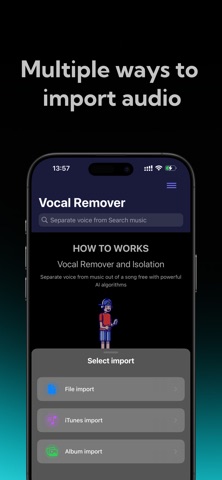
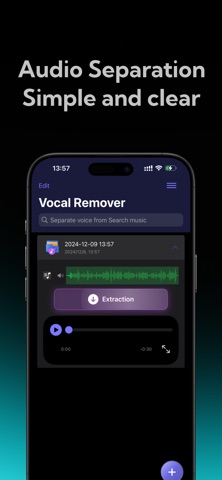
Vocal Remover is a high-performance AI audio processing tool designed for music enthusiasts, audio creators, and professional sound engineers—and is also accessible for everyday users. Whether you want to create karaoke tracks, edit audio, teach music, or craft mixes, this app offers precise, high-quality track separation. With cloud-based AI technology, you can easily isolate vocals or accompaniment with a single tap, giving you endless creative freedom.
Key Features
1. One-Tap Vocal and Accompaniment Separation
a. Effortless Extraction: Simply upload your audio file, and Vocal Remover’s smart AI will quickly analyze it to separate the vocal and accompaniment tracks. Whether you’re working with songs, soundtracks, or other audio files, enjoy clear, noise-free separation suitable for any purpose.
2. Flexible Separation Modes
a. Two-Track Separation: Quickly split vocals and accompaniment, ideal for those needing basic separation, such as for karaoke practice or creating accompaniment tracks.
3. AI-Powered, High-Quality Output
a. With cutting-edge AI technology, Vocal Remover uses cloud-based analysis to precisely separate vocals from accompaniment, effectively filtering out noise and ensuring clear, high-fidelity audio output. Enjoy top-notch audio quality that maintains clarity and fidelity in separated tracks.
b. Fast Processing: Whether working with high-quality files or extended audio clips, cloud-based AI algorithms deliver fast results in seconds, saving time and making audio processing efficient.
4. User-Friendly Interface
a. Easy Operation, Beginner-Friendly: With an intuitive and clean design, even first-time users can navigate the app with ease. Simply upload your audio file, choose a separation mode, and the system handles the rest, making it accessible for users of all backgrounds.
b. Multi-Track Editing: The five-track separation mode supports multi-track editing, enabling further customization and remixing of separated tracks—ideal for professional editing and creation.
Ideal Use Cases
● Karaoke Enthusiasts: Want to practice singing but need a professional accompaniment? Vocal Remover can quickly isolate vocals, providing you with a karaoke-ready track in seconds.
● Education and Music Instruction: Music teachers and students can use this tool to deconstruct complex audio files, gaining insights into each track’s details and improving learning outcomes.
● Audio Researchers: Isolate different tracks to analyze audio components, supporting research and analytical work with accurate, separated data.
Privacy and Security
● Secure Cloud Processing: Your audio files are processed on a secure cloud server and deleted immediately after, ensuring full privacy without being stored or shared.
Subscription instructions and terms
1. Week Membership - $2.99
2. Month Membership -$4.99
3. Year Membership - $29.99
GET AUDIO SEPARATION, UNLIMITED SONG UPLOADS
【Payment】The payment will be charged to the user's iTunes account upon purchase confirmation.
【Renewal】“Continuous Monthly/Quarterly/Annual” products are auto-renewable subscriptions. Upon purchase confirmation, fees will be deducted from your iTunes account. Subscriptions will auto-renew unless auto-renewal is turned off at least 24 hours before the end of the current subscription period. Within 24 hours before your subscription expires, Apple will automatically charge your iTunes account and your membership will be automatically extended for one subscription period upon successful payment.
【Cancel Renewal】To cancel auto-renewal, manually go to iOS Settings > Apple ID > Subscriptions, and cancel the “Vocal Remover: music separator” subscription.
-- Terms of Service https://htmlpreview.github.io/?https://github.com/zhangxin1982/panger/blob/main/vocalAgreement.html
-- Privacy Policy https://htmlpreview.github.io/?https://github.com/zhangxin1982/panger/blob/main/vocalPrivacy.html