You're away from your PC, but you need to check an admin panel or business site right now. This app is built for exactly that moment.
ViewChanger is a browser app that lets you view any website in full PC layout from your phone. Fields and columns that mobile view hides in admin panels and business systems stay visible once you switch to PC layout — and the change happens instantly, with no page reload.
■ When This Helps
• Checking or operating an admin panel while you're out
• Mobile view hides key fields, making work difficult
• Safari's "Request Desktop Website" isn't enough
• No PC on hand, but you need to handle something right now
• Checking a business site or internal company tool from your phone
■ Great For Checking
• CMS and WordPress admin panels
• E-commerce admin panels
• Ad manager dashboards, booking and sales dashboards
• Internal business systems and dashboards
■ Key Features
• Change viewport width instantly with no page reload (390px–3840px)
• Check how sites respond to 74 different User-Agent strings
• Switch between iPhone, iPad, and desktop resolutions with one tap
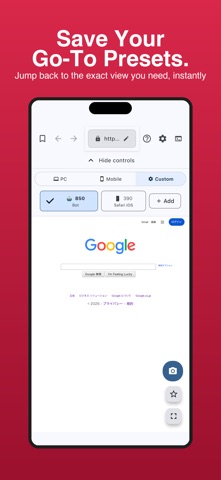
• Save up to 10 custom presets for settings you use often
• Share results instantly with the built-in screenshot feature
• Bookmark favorite sites for one-tap access
■ Also Great For Web Creators
ViewChanger also helps web designers who spend too much time on responsive design checks, frontend engineers who want to streamline cross-browser checks, and QA engineers who need to verify layouts across multiple devices.
■ How To Use
1. Enter a URL to load the site
2. Choose PC, Mobile, or Custom mode
3. Adjust the viewport width with the slider
4. Change the User-Agent if needed
■ Privacy & Security
Your browsing data and personal information are never sent externally. All settings are stored locally on your device only.
The browser that's most useful the moment you don't have a PC.