Stop wondering, “Did I do that?”
Trackalot is an outboard memory for the small, repeatable events life makes easy to forget. Log the moment you take medication, feed the dog, drink water, finish a workout, complete a chore, notice a symptom, or do anything else worth remembering. One tap creates a timestamped record, so the answer is waiting when your memory isn’t.
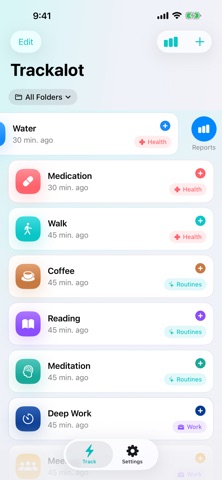
Capture it in the moment
Create folders for Health, Pets, Work, Routines, or any part of life. Add trackers inside them, then tap to log instantly. Touch and hold to add a note or change the timestamp. Swipe right to edit a tracker, swipe left to open its report, or shake your iPhone to undo the latest tap.
Turn taps into insight
Review one tracker, one folder, or everything together. Switch between rolling 1-day, 7-day, 30-day, 90-day, and 1-year views. Follow charts, totals, today and this week counts, streaks, and chronological history. Edit or delete individual entries whenever you need to correct the record.
Log from wherever you are
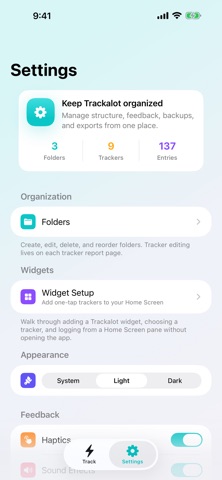
Add a one-tap Home Screen widget or log from Apple Watch with the companion app and complication. Folder names appear in widget selection and on the widget itself, while the Watch groups trackers by folder. Hide trackers you do not need on your wrist to keep the list focused.
Built to prevent mistakes
Velocity Check helps block accidental repeat taps across iPhone, Home Screen widgets, and Apple Watch. It is on by default, uses a separate cooldown for each tracker, and can be set from 1 to 60 seconds or turned off.
Automatic backups target a four-hour schedule. Trackalot uses iCloud when available, falls back to local storage when needed, keeps the newest 100 backups, and can offer to restore your history when an empty reinstall finds a previous backup.
Your data, your way
Export the report you are viewing as CSV or a print-ready PDF. Export your complete archive as CSV or JSON, send an individual tracker’s entries to Calendar, or create and restore backups manually whenever you choose.
No account. No ads. No subscription. No user tracking.
Trackalot includes:
- Fast one-tap timestamped logging
- Optional notes and custom timestamps
- Folders and folder-aware tracker labels
- Individual, folder, and all-tracker reports
- Rolling views from 1 day to 1 year
- Charts, totals, streaks, and editable history
- Home Screen widgets and Apple Watch logging
- Adjustable duplicate-tap protection
- Shake to undo the latest tap
- Automatic and manual backup and restore
- CSV, JSON, PDF, print, and Calendar export
- Light, dark, and system appearance
- Optional haptics and sounds
For habits, routines, symptoms, medication, pet care, focus sessions, meals, hydration, chores, workouts, mood checks, or your own completely specific thing: if it happens repeatedly and you want to remember it, Trackalot is ready to tap.