"Where did all my money go this month?"
Payday feels great. But then you grab one more thing at the store, small purchases pile up, and by month-end you're scraping by. You just can't seem to stop the money from slipping away.
Toriwake is built to stop overspending — not to make you log receipts, but to keep you from spending too much in the first place.
■ Always know what's left to spend
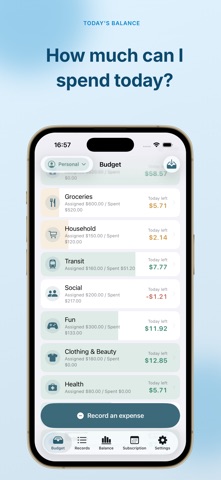
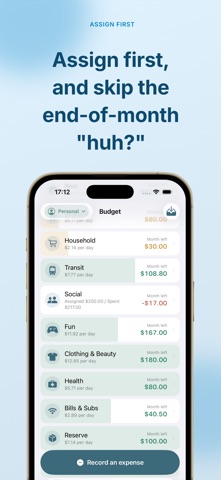
At the start of the month, you divide your income across your spending categories. Then "How much can I spend today?" is always one glance away. Your balance drops in real time as you spend, so you catch yourself at the register — "maybe not today." When the limit is visible before you spend, you can enjoy what's left, guilt-free.
■ It never scolds you
Go over your limit and there's no angry red alert. Just a calm note: "this one's running low a little early." Because it doesn't blame you, opening the app never feels bad — so you keep going. Overspending becomes a discovery for next month, not a failure.
■ Logging takes seconds
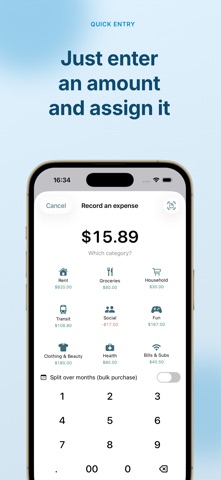
Enter an amount, pick a category. That's it. Snap a receipt or screenshot and the amount and store fill in automatically. Choosing which category to spend from — that one small tap — is what puts the brakes on overspending.
■ Subscriptions, all in one place
Pick from 466 major services and the monthly charge is added for you. See when and how much you'll be billed on a monthly calendar. Cancellation reminders help you avoid forgetting to quit before a free trial ends.
■ It learns your spending habits
After a few months, the app learns your patterns. It gently nudges you when you forget to log, and adds a short reflection at month-end. On Apple Intelligence devices, that reflection is generated by on-device AI.
■ Your money never leaves your device
The amounts, categories, and receipt photos you enter are never sent off your device. No account, no bank connection. Everything works offline.
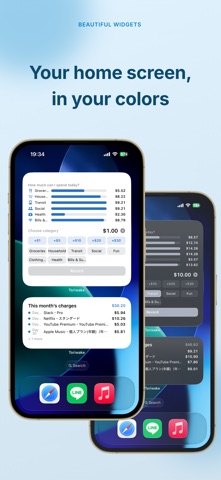
■ Home Screen widgets
- Four widgets: Left Today / Left This Month / Subscription bills / Quick entry
- Customize background, accent, and text color
- Lock Screen widgets supported
This app is for you if you:
- Tend to overspend without meaning to
- Feel flush on payday but broke by month-end
- Can't recall where all the small purchases went
- Can't say how many subscriptions you're paying for
- Don't want to be scolded for overspending
- Are wary of bank connections and data sharing
Start by simply dividing up this month's money. Set your limits before you spend, and the money stops slipping away.
This app helps you curb overspending and does not provide investment or financial advice.
———
Terms of Use (EULA): https://toriwake.askwhite.jp/en/terms.html
Privacy Policy: https://toriwake.askwhite.jp/en/privacy.html