Solve Sudoku puzzle in Realtime
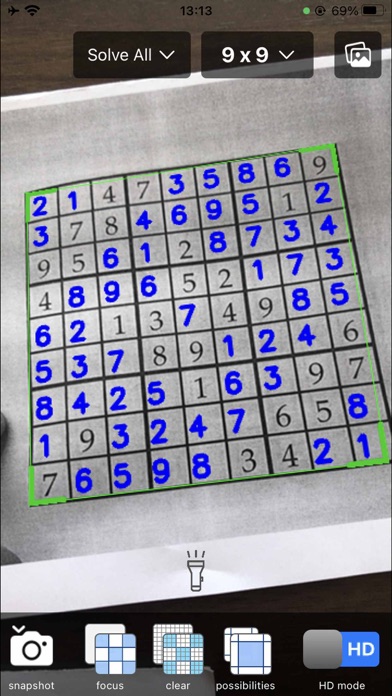
This app identifies and solves Sudoku puzzles in real time and overlays the solution on the camera image. Also, error checks for invalid Sudoku boards are displayed on the camera image.
You can also pick a photo from the Photos album to solve.
FEATURES:
Currently supports 9x9 and 4x4 Sudoku boards.
Three puzzle solving modes.
- Solve all grids - Solve the puzzle completely.
- Solve a grid - Solve a random grid for you.
- Hint a grid - tells you which grid is best to solve on the next move (i.e., fill in the grid with the fewest possible numbers).
Check for errors
Checks if the puzzle board is valid, can be solved and has a single solution, the result of which is displayed superimposed on the camera image. A valid Sudoku board requires that the numbers in each row/column/box are unique.
Different rectangles drawn on a recognized Sudoku board indicate the results of a check
A green bounded rectangle indicates that the Sudoku board is valid and can be solved.
Red bounding rectangles indicate that the Sudoku board is invalid (conflicting rows/columns/boxes), and invalid grids are presented with a red flash.
Orange bounding rectangles indicate that the Sudoku board is unsolvable, and unsolvable grids are presented in flashing purple.
Check if your final solution is correct
If the Sudoku board was solved correctly, a green bounding rectangle will be displayed, otherwise a red rectangle will be displayed, along with the grid with the error.
Supports handwritten numbers - as long as they are written clearly.
Additional Features
Focused view mode - scanned Sudoku board is enlarged to full screen size.
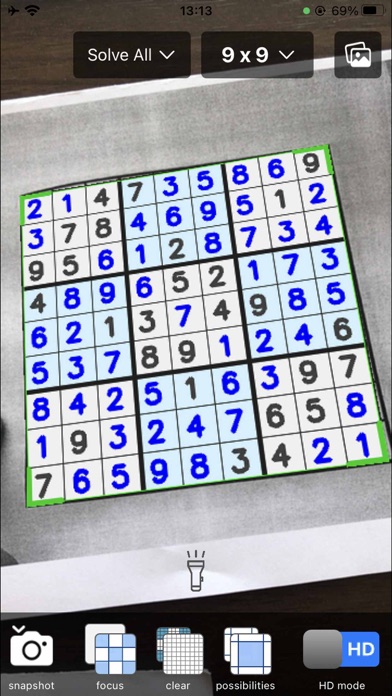
Clear view mode - the scanned Sudoku board is re-rendered with the numbers printed on a clear colored background.
Show possible numbers - possible filled-in numbers are shown in a blank grid like pencil marks (NOTE: only available when the solution mode is [Solve a Grid] or [Hint a Grid]).
HD mode - enables the highest resolution of the camera to improve the accuracy of OCR (Note: HD mode runs smoothly on the latest iPhones, older devices may lag, in this case please use SD resolution mode).
There is a snapshot button in the lower left corner to stop scanning so you can write down your answers.
NOTE: Place the camera as close to the Sudoku puzzle as possible for best accuracy.
About In-app Purchase & Subscription:
Subscriptions will automatically renew unless canceled within 24-hours before the end of the current period. You can cancel anytime with your iTunes account settings. Any unused portion of a free trial will be forfeited if you purchase a subscription.
Privacy Policy: https://whitewhalesoft.com/apps/sudokusolverrealtimecamera/privacy.html
Terms & Conditions: https://whitewhalesoft.com/apps/sudokusolverrealtimecamera/terms.html
Have any suggestions or questions? Please feel free to email me at zhaoxiaojian@hotmail.com