SUBCAM is a camera that burns live captions right into your video as you shoot.
Speak while recording and your words appear on screen in real time — and they are baked into the saved video. No editing, no exporting to another app.
KEY FEATURES
- Live Speech Captions
On-device speech recognition turns your voice into subtitles the moment you speak — captions appear live even before you start recording. Supports Japanese, English, Chinese, Korean, and more.
- On-Device Translation (iOS 18 or later)
Speak in one language, caption in another. Real-time translation runs entirely on device, no internet connection required. Switch it on with one tap from the capture screen.
- AI Scene Captions
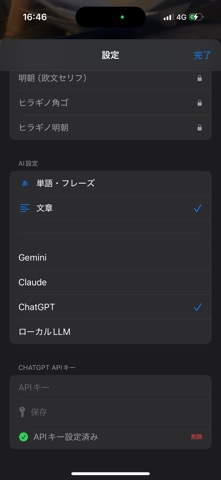
Point the camera at anything and AI describes what it sees, as short words or full sentences. Bring your own API key for Claude, ChatGPT, or Gemini, connect a local LLM, or use Apple Intelligence fully on device. You can even choose the exact model for each provider.
- Cinematic Looks
Switch between Standard, CinemaScope (2.39:1 letterbox), Cinematic tone, and Monochrome with one tap, right above the shutter. Letterbox color is customizable.
- Style Captions While You Shoot
Tap the "Aa" button to change caption size, position (top / center / bottom / danmaku barrage), and font — with a live preview behind the panel. Five fonts including Japanese Gothic and Mincho.
- A Camera That Feels Familiar
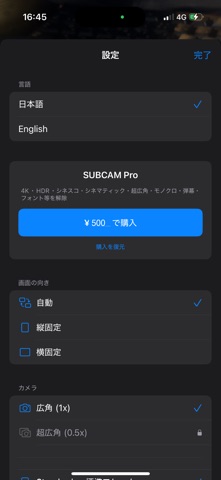
Standard camera layout: big shutter, recent-clip thumbnail, 0.5x/1x lens switch, pinch zoom, tap to focus. Non-essential controls fade away while recording so you can focus on the shot.
FREE
- 1080p 30fps recording (with a small #SUBCAM watermark)
- All caption features: speech captions, AI captions, translation
- All looks, caption styling, and fonts
SUBCAM PRO (one-time purchase)
- 4K and 60fps recording
- HDR video
- Exposure adjustment
- Removes the #SUBCAM watermark
Perfect for vlogs, street snaps, interviews, travel videos, language learning, and accessibility — shoot once, share immediately, captions included.