Water tracking and intermittent fasting, together in one calm app.
Sip helps you drink enough water and keep your fasting window without switching between two apps. Log a drink in a tap, watch your glass fill toward today's goal, and start a 16:8 fast from your iPhone or your Apple Watch.
Sip is free to download. Unlocking all of Sip takes a yearly subscription, which starts with a free trial for eligible new subscribers, or a one-time Lifetime purchase.
WATER TRACKER
• Drag the interactive glass up to log what you drank
• Quick-add presets or a custom amount
• A daily water goal in ounces, cups, milliliters, or liters
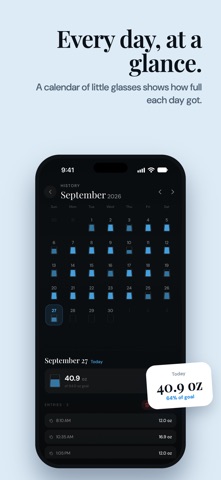
• A history calendar to look back at every logged day
INTERMITTENT FASTING TIMER
• Choose a 12:12, 14:10, 16:8, or 18:6 plan
• See elapsed and remaining time at a glance
• Adjust your start time if you began earlier
• Review your saved fasting sessions
• End a fast whenever you choose
REMINDERS THAT FIT YOUR DAY
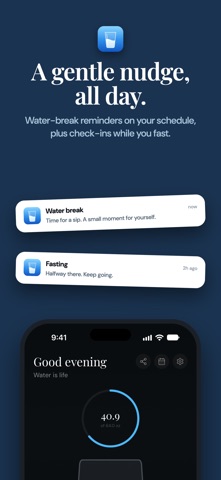
• Water reminders on the schedule you choose
• Optional fasting reminders: a halfway check-in, water breaks while you fast, and a note when your planned time is complete
APPLE WATCH APP
Log water, check today's progress, and start or end a fast from your wrist. Tap a Sip notification and it opens the right page.
YOUR WATER IN APPLE HEALTH
With your permission, Sip saves the water you log to Apple Health. You can also choose to export past Sip water entries with their original dates and times. Sip only writes water data and does not read any Health data. Fasting sessions stay in Sip.
MAKE IT YOURS
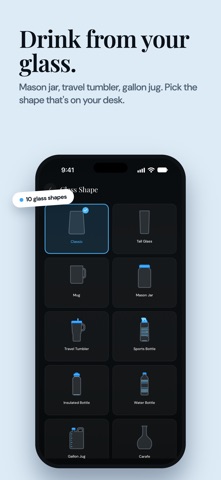
• 10 glass shapes and color themes
• Light and dark mode
• Share cards for your water progress and finished fasts
• Available in 47 languages
• No Sip account required
SUBSCRIPTION INFORMATION
Sip offers an auto-renewing yearly subscription and Sip Lifetime, a one-time purchase that never renews. Prices, and the length of any free trial, are shown before purchase. Payment is charged to your Apple Account at confirmation; after a free trial, the subscription price is charged when the trial ends unless you cancel at least 24 hours before. Your subscription renews automatically unless canceled at least 24 hours before the current period ends. Manage or cancel your subscription in your App Store account settings. Restore an existing purchase from the paywall or from Settings.
Sip is a wellness tracking and timing tool, not a medical device. It does not measure blood glucose or provide medical advice.
Support: https://sipstayhydrated.featurebase.app
Privacy Policy: https://drive.google.com/file/d/1YhXeO9lK9qlntszQ4bM3KxlQ8GIPjjUn/view
Terms of Use (Apple Standard EULA): https://www.apple.com/legal/internet-services/itunes/dev/stdeula/