A video compressor that makes your videos up to 90% smaller — without losing the quality you can actually see, and without uploading a single frame.
Your iPhone films in huge files. One minute of 4K can take over 400 MB, and a few trips and birthdays later "iPhone Storage Full" is back. Shrink re-encodes those videos right on your phone, so you keep every memory at a fraction of the size.
COMPRESS VIDEO — UP TO 90% SMALLER
• Batch-compress your whole camera roll, not one clip at a time
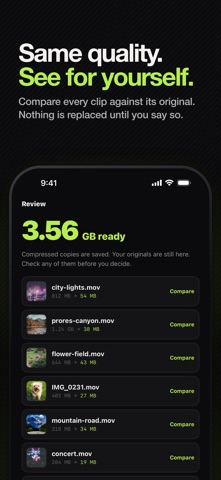
• 812 MB becomes 54 MB, and it still looks the same on a phone screen
• Handles 4K, HDR, ProRes and long clips without failing at 99%
• With Pro on iOS 26, runs in the background — start a big batch and put your phone down
• See exactly how many GB you got back, every time
SEE THE QUALITY BEFORE YOU KEEP IT
• Compare every compressed clip against its original, side by side
• Nothing is replaced until you say so — keep both if you want
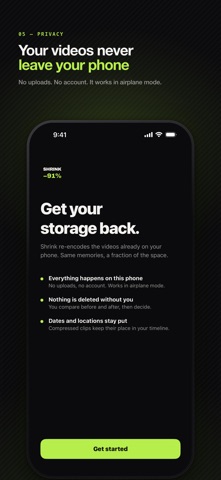
• Dates, locations and HDR all survive the re-encode
• Three levels — Space Saver, Balanced, High Quality — and you pick
WHAT IT REFUSES TO TOUCH
Most compressors flatten anything you hand them. Shrink skips the clips that would be damaged, and tells you why on the row instead of silently dropping them:
• Slo-mo — re-encoding can flatten the slow-motion effect
• Cinematic — compression would discard the depth and focus data
• Live Photos — the still and the clip would come apart
• Spatial video — the second eye would be lost
If you disagree on any single clip, open it and compress it anyway.
FIND THE BIGGEST WINS FIRST
• Your largest videos, sorted biggest first
• Filter to files over 100 MB, clips older than a year, or screen recordings
• Screen recordings are usually the easiest gigabyte you will ever get back
• Originals go to Recently Deleted, so there is always an undo
BUILT FOR BIG BATCHES
• With Pro, lock your phone mid-batch — progress continues on the Lock Screen
• If your iPhone gets warm, Shrink pauses itself instead of pushing through
• A running batch always finishes, even if your Pass expires mid-job
• Optional: let Shrink watch for new large videos and quietly nudge you
ON-DEVICE BY DESIGN
• 100% on-device processing — your videos never leave your iPhone
• No account, no sign-up, no ads
• Works in airplane mode, on a plane, in a tunnel, anywhere
• Your plan is verified on device, so nothing waits on a network
• No watermark, ever
GOOD FOR
• Sending a clip that is "too large to attach"
• Clearing space before a trip, an update, or a new phone
• Years of screen recordings you forgot were there
• Keeping 4K memories without paying for a bigger iCloud plan
If your storage bar is red and you refuse to delete your memories or rent them back from the cloud, this is the video compressor you were looking for.
Download now and get your gigabytes back.
Terms of Use (EULA): https://shrink.ripeseed.io/terms.html
Privacy Policy: https://shrink.ripeseed.io/privacy.html