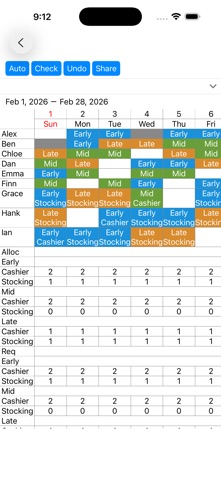
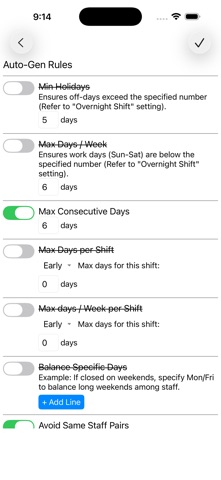
Smart Shift Creation & Automation Our app supports your scheduling process from start to finish. You can manually assign specific shifts and let the system automatically fill in the remaining gaps. The auto-assignment engine creates the most balanced and fair schedule possible, strictly following your custom rules.
Customizable Assignment Rules:
1. Staffing Requirements
Set the required number of staff for each date, shift type, and specific task/role.
2. Individual Staff Settings
Basic Availability: Set recurring days off or unavailable shifts by day of the week.
Specific Requests: Block or prioritize shifts for specific dates.
Workload Limits: Define maximum working days per month or per week.
Shift-Specific Limits: Set the maximum number of times a specific shift (e.g., Night Shift) can be assigned.
Priority Assignments: Designate preferred shifts for specific staff members.
Monthly Hour Caps: Set maximum working hours per month.
3. Advanced Scheduling Logic & Rules
Consecutive Work Limits: Prevent burnout by limiting consecutive work days (e.g., no more than 6 days in a row).
Consecutive Shift Limits: Restrict back-to-back specific shifts (e.g., no double night shifts).
Mandatory Rest Periods: Specify required days off after certain shifts (e.g., 2 days off after a night shift).
Shift Sequencing: Prohibit specific shift sequences for health and safety (e.g., no "Early Shift" immediately after a "Night Shift").
Post-Rest Day Rules: Block specific shifts on the day following a post-night-shift rest day.
Optimized Holidays: Logic to minimize "isolated" work days and encourage consecutive days off.
Turnaround Rules: Prevent "Late Shift to Early Shift" transitions to ensure adequate rest.
Mandatory Successions: Define shifts that must follow one another (e.g., "Late Night Shift" must follow a "Semi-Night Shift").
Skill Balancing: Prevent shifts consisting only of staff members who require extra support.
Compatibility (Pairing) Rules: Block specific combinations of staff from being assigned to the same shift (e.g., Staff A and Staff B cannot work together).