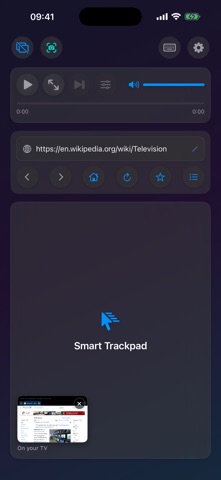
Turn your iPad or iPhone and an external monitor or TV into a desktop browsing workstation, even on a non-M iPad, where iPadOS extended display isn't available.
The big screen gets a full desktop-class browser. Your iPad or iPhone becomes the trackpad and keyboard: 8 cursor styles, up to 12 persistent tabs, YouTube quality up to 4K, and Netflix and other streaming over a cable. Pay once, no subscription.
IMPORTANT: REQUIRES AN EXTERNAL MONITOR OR TV. ScreenCommand runs the browser on an external display connected over USB-C (or a USB-C-to-HDMI/DisplayPort adapter) or via AirPlay to an Apple TV, and your iPad or iPhone becomes the trackpad and control center. Without a display connected, the app opens to a "Connect External Monitor" setup screen. There is no standalone on-device browsing mode.
STREAMING ON THE BIG SCREEN: Netflix, Prime Video, Apple TV+, Paramount+, Peacock and other streaming services play on the TV over a USB-C cable. YouTube, Vimeo, and other web video play over a cable or AirPlay.
SEAMLESS EXTERNAL DISPLAY
• Full web browsing on your external monitor
• Automatic display detection - plug and play
• Optimized for 1080p, 4K, and ultrawide displays
ADVANCED CURSOR & CONTROLS
• Eight stunning cursor styles: Default, Cyberpunk Neon, Elegant Glass, Liquid Crystal, Gaming Pro, Luxury Gold, Aurora Borealis, Minimal Dark
• Smooth trackpad navigation with gesture support
• Adjustable mouse sensitivity (0.5x - 5.0x)
• Natural scrolling with two-finger gestures
• Precise click, double-click, and right-click support
INTELLIGENT KEYBOARD INPUT
• Full keyboard support for web forms and search
• Smart URL bar: type a web address or a search query
• Google search integration for quick queries
• Automatic input field detection and focus
MEDIA CONTROLS
• Play/pause video with one tap
• Change YouTube video quality on the fly, up to 4K (2160p), even in fullscreen
• Adjust media volume with an on-screen slider
• Seek through videos with intuitive progress bar
• Fullscreen toggle support
• Cinema mode for distraction-free viewing
POWERFUL BROWSING FEATURES
• Up to 4 browser windows with 12 tabs each, saved between sessions
• Back/forward navigation
• Refresh and home buttons
• Desktop mode for full website compatibility
• YouTube optimization for better playback
• Prevents unwanted app redirects
CUSTOMIZATION
• Adjustable cursor size (0.2x - 5.0x)
• Adjustable mouse speed for precision or speed (0.5x - 5.0x)
• Configure homepage URL
• Auto-launch browser on monitor connect
PRIVACY FIRST
• No data collection or tracking
• No third-party analytics
• All processing happens locally on your device
• No internet connection required (except for browsing)
PERFECT FOR:
• Professionals who need a larger workspace
• Students doing research on a bigger screen
• Content creators managing social media
• Anyone wanting desktop browsing from an iPad or iPhone
HOW IT WORKS:
1. Connect your iPad or iPhone to an external monitor (USB-C or HDMI adapter), or AirPlay to an Apple TV
2. Launch ScreenCommand
3. Browser automatically opens on your external display
4. Use your iPad or iPhone as a trackpad and control center
5. Enjoy desktop-class browsing!
REQUIREMENTS:
• iPad with a USB-C port on iPadOS 17.0 or later (no M-series chip required)
• Or iPhone on iOS 17.0 or later. A cable needs USB-C video out (iPhone 15 or later, except iPhone 16e, iPhone 17e and iPhone Air); any iPhone can use AirPlay
• External monitor or TV
• USB-C to HDMI/DisplayPort adapter (or direct USB-C connection), or an Apple TV for wireless AirPlay (wired recommended for the lowest cursor latency)
ScreenCommand brings true desktop browsing to the external display of your iPad or iPhone.