StoreIntel
AppsTop ChartsTrendingKeywordsMy Apps
Not affiliated with Apple Inc. App Store is a trademark of Apple Inc.Top chartsSupportTermsPrivacy

Scanner App Scan PDF & Docs

APPWILL COMPANY LTD · Productivity · 2mo old

FreeNew
◆ ProTrack this app App Store

Performance · US

Est. downloads / month · US

<5K

Below chart threshold

Est. revenue / month · US

<$5K

Below chart threshold

Rating · US

—

no ratings yet

Chart position

Rank history — US · Top Free

Apple's Top Free chart — free apps ranked by recent downloads.

Top FreeTop Grossing

Ratings count — US

0
◆ Pro1 chart locked

See the numbers behind the rankings

  • Keyword RankingsWhich App Store searches it ranks for, and where
Unlock everything

Listing

About

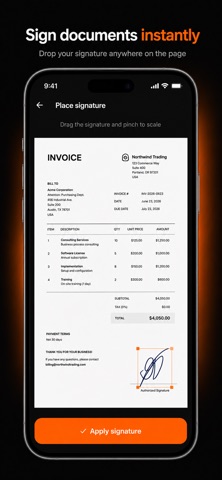
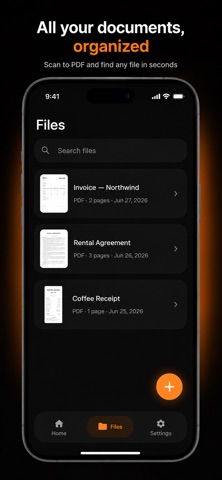
ScanFlow turns your iPhone into a fast, pocket-sized document scanner. Scan any paper — contracts, receipts, IDs, notes, books, or whiteboards — and instantly get clean, high-quality PDFs you can sign, share, and store. SCAN ANYTHING • Automatic edge detection and perspective correction • Crisp, color-accurate scans with smart filters • Multi-page scanning into a single PDF POWERFUL PDF TOOLS • Convert scans to PDF or JPG • Merge, reorder, and delete pages • Compress files to save space SIGN & ANNOTATE • Add your signature to any document • Add text and annotations • Fill and finish forms on the go ORGANIZE & FIND • Keep every document tidy in one library • Quickly search and reopen recent scans SHARE INSTANTLY • Export via Mail, Messages, AirDrop, or any app • Save to Files and your favorite cloud storage PRIVACY FIRST • Your documents stay on your device • No account required — works offline No watermarks. No hidden limits. Just a clean, reliable scanner that does the job. Download ScanFlow and start scanning in seconds.

Released
Jul 23, 2026
Category
Productivity
Content rating
4+
Price
Free
In-app purchases
No
Developer site
skan-flow.netlify.app ↗
WWUSGBDEJPINBR

No chart data

No rank history yet for this selection.

→

Screenshots

5
Scanner App Scan PDF & Docs screenshot 1Scanner App Scan PDF & Docs screenshot 2Scanner App Scan PDF & Docs screenshot 3Scanner App Scan PDF & Docs screenshot 4Scanner App Scan PDF & Docs screenshot 5