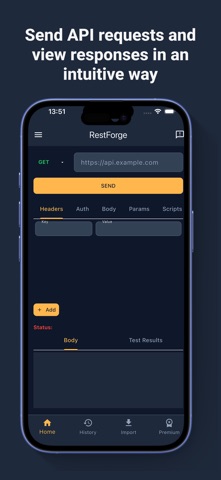
RestForge - API Testing is a powerful, lightweight API client for developers and testers. Build, test, debug, and automate your APIs directly from your phone — no laptop required.
KEY FEATURES
SEND & TEST REQUESTS
• All HTTP methods: GET, POST, PUT, PATCH, DELETE, HEAD, OPTIONS
• Body types: JSON, raw text, XML, HTML, JavaScript, Form-data, file uploads
• Headers with smart hints, URL parameter editor, custom timeout
• Basic Auth and Bearer Token support
IMPORT FROM POPULAR API TOOLS
Import collection files compatible with:
• Postman Collection (v2.0 / v2.1)
• Insomnia, Bruno, Thunder Client
• Hoppscotch, Apidog, SoapUI, HTTPie
• RapidAPI, HTTP Archive (HAR), cURL
• OpenAPI / Swagger (2.0, 3.0, 3.1)
(Uses standard exported formats. RestForge is not affiliated with or endorsed by any of these services.)
CLOUD SYNC — 5 PLATFORMS
Connect your API platform to sync collections across devices:
• Postman · Apidog · SwaggerHub · Hoppscotch · RapidAPI
Bidirectional sync with intelligent 3-way merge conflict resolution.
PRE & POST-REQUEST SCRIPTING
• JavaScript scripting before and after every request
• Full pm.* API: pm.test(), pm.expect(), pm.sendRequest()
• Chai-style assertions and console logging
• Set/get environment, collection, and global variables from scripts
ENVIRONMENTS & VARIABLES
• Multiple environments (dev, staging, production)
• {{variable}} syntax in URLs, headers, and body
• Collection-scoped and global variables
SOAP / WSDL SUPPORT
• Parse WSDL 1.1 definitions and browse operations
• Auto-generate SOAP envelopes (SOAP 1.1 & 1.2)
• Automatic SOAPAction headers and SOAP Fault parsing
RESPONSE VIEWER & HISTORY
• Syntax-highlighted viewer for JSON, XML, HTML, JavaScript
• Inspect response time, status codes, and headers
• Copy, share, or save responses
• Full request history — revisit, edit, or resend anytime
CODE EXPORT
• cURL (free)
• JavaScript, Python, Dart, Go (Premium)
REQUEST SCHEDULING
• Schedule API requests at defined intervals with cron support
• Background execution without manual interaction
ANALYTICS DASHBOARD (Premium)
• Request counts by method, response time trends
• Status code distribution and 30-day daily usage
COLLECTIONS & ORGANIZATION
• Offline-first — works without internet
• Offline queue with auto-retry on reconnect
UPGRADE TO PREMIUM
• Ad-free experience
• Code export: JavaScript, Python, Dart, Go
• Response compare & diff viewer
• Analytics dashboard with full metrics
• Advanced cloud sync and API scheduling
SUBSCRIPTION INFO
Subscriptions are charged to your Apple ID at purchase. Auto-renews unless cancelled at least 24 hours before the current period ends. Manage in App Store settings.
Terms of Use: https://www.apple.com/legal/internet-services/itunes/dev/stdeula/
Privacy Policy: https://restforge.org/privacy-policy.html