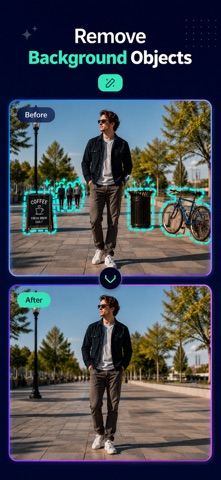
Clean up your photos with an easy-to-use AI object remover.
Brush over anything you want to remove, such as an unwanted object, person, text, or other distraction. The app then helps blend the edited area with the surrounding background for a cleaner result.
Use it to improve travel photos, product images, portraits, and everyday pictures without complicated editing tools.
AI OBJECT REMOVER
Select the unwanted area with the brush tool and let AI process the photo. The app analyzes the surrounding image to create a cleaner and more natural-looking result.
REMOVE UNWANTED PEOPLE
Someone walked into your photo at the wrong moment? Erase unwanted people, strangers, tourists, or photobombers while keeping the main subject in focus.
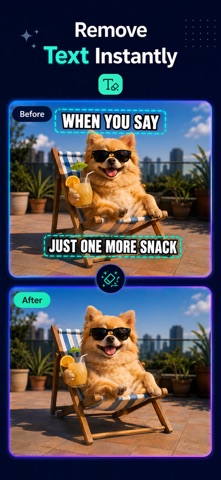
TEXT REMOVER
Remove unwanted text from photos, including captions, dates, labels, stickers, signs, and other visible writing.
LOGO REMOVER
Clean up logos and overlays from photos you own or have permission to edit. The removal tool can also help clear small marks and distracting graphic elements.
REMOVE WHAT DISTRACTS YOU
A great photo can be spoiled by one unwanted detail. Use the object removal tool to erase distracting items and keep attention on what matters most.
• Remove unwanted objects from photos
• Erase people, tourists, and photobombers
• Remove text, dates, captions, and stickers
• Clean up logos and visible marks
• Delete wires, cables, signs, and background clutter
• Clear distracting items from product photos
• Simplify busy backgrounds
• Improve travel, portrait, landscape, and social photos
CLEAN UP PHOTOS IN A FEW STEPS
* Choose a photo from your library
* Highlight the object or area you want to remove
* Let the AI eraser process your selection
* Review the edited image
* Save and share your cleaned photo
SIMPLE CONTROLS, CLEANER RESULTS
You do not need advanced editing experience. The app is designed to make object removal quick and easy, with straightforward controls that help you focus on the photo instead of complicated settings.
For the best result, carefully cover the full unwanted object and include a small area around its edges. Detailed backgrounds or large objects may need an additional selection.
Remove unwanted objects, clean up distractions, and give your photos a clearer, more polished look with AI-powered photo editing.
Terms of Use (EULA): https://sites.google.com/view/termofuseremoveobjectios