StoreIntel
AppsTop ChartsTrendingKeywordsMy Apps
Not affiliated with Apple Inc. App Store is a trademark of Apple Inc.Top chartsSupportTermsPrivacy

Remote Control: For TV

AI Powered App · Productivity · 3mo old

Free
◆ ProTrack this app App Store

Performance · Worldwide

Est. downloads / month · WW

<5K

Below chart threshold

Est. revenue / month · WW

<$5K

Below chart threshold

Rating · WW

4.7★

14 ratings

Chart position

Rank history — US · Top Grossing

Apple's Top Grossing chart — all apps ranked by revenue (purchases + subscriptions).

Top FreeTop Grossing

Ratings count — US

14
◆ Pro1 chart locked

See the numbers behind the rankings

  • Keyword RankingsWhich App Store searches it ranks for, and where
Unlock everything

Listing

About

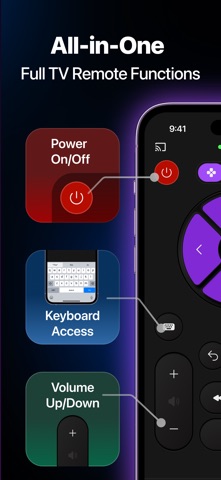
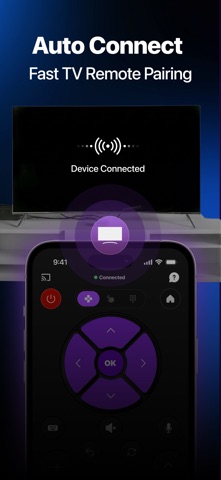
Turn your iPhone into a powerful, all-in-one TV remote. Whether your original remote is lost, broken, or just out of reach, this app gives you full control of your smart TV in seconds—no setup stress, no clutter. [Features] - Quick and seamless connection: Connect to your Smart TV over Wi-Fi in just a few taps. The app automatically detects compatible devices on your network so you can start controlling instantly. - D-pad, touchpad, and numpad in one app: Switch channels, adjust volume, power your TV on/off. Easily navigate your TV menus with a clean, responsive interface designed for everyday use. - Keyboard input made easy: Typing on TV is painful - we fix that. Enter text directly from your phone to search shows, log in to apps, or browse the web on your TV. - Works with popular Smart TVs: Our app is compatible with a wide range of Smart TV brands, making it your go-to remote for multiple devices at home. Privacy Policy: https://sites.google.com/soosky.co/tv-remote-policy/ Terms of Use: https://sites.google.com/soosky.co/tv-remote-terms/

Released
Jul 14, 2026
Category
Productivity
Content rating
4+
Price
Free
In-app purchases
No
Developer site
kyzenolabs.com ↗
WWUSGBDEJPINBR

No chart data

No rank history yet for this selection.

→

Screenshots

7
Remote Control: For TV screenshot 1Remote Control: For TV screenshot 2Remote Control: For TV screenshot 3Remote Control: For TV screenshot 4Remote Control: For TV screenshot 5Remote Control: For TV screenshot 6Remote Control: For TV screenshot 7