Code, run, debug, and learn Python on your iPhone or iPad with a real Python 3 IDE.
Python Code Editor & IDE gives you a genuine embedded Python 3 interpreter, full standard library, local execution, offline coding, debugging, pip packages, projects, testing, data science tools, and Python lessons.
No server or account required to run your Python code.
▸ REAL PYTHON 3 — RUN OFFLINE
• Embedded Python 3 interpreter and standard library
• Run Python locally and offline
• Live console output and interactive input()
• Inline Matplotlib charts
▸ DESKTOP-CLASS PYTHON CODE EDITOR
• Multi-tab editor and split view
• Python syntax highlighting
• Autocomplete and code completion
• Hover information and code insights
• Find and replace
• Outline and symbol search
• Go to definition
• Problems panel
• Code snippets
• Format and lint on save
• Keyboard shortcuts
▸ PYTHON DEBUGGER
• Breakpoints and conditional breakpoints
• Step in, step over, step out
• Locals, watches, and call stack
• Expression evaluation
• Break on exception
▸ REPL & PYTEST
• Interactive Python REPL
• Resettable namespace
• Run pytest tests
• Support for test_*.py
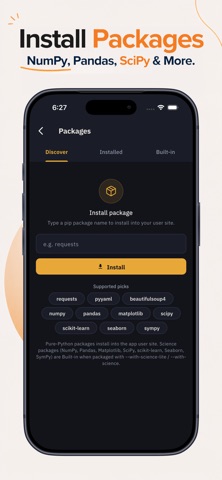
▸ PYTHON PACKAGES WITH PIP
Use popular Python libraries on iPhone and iPad:
• NumPy • pandas • Matplotlib
• SciPy • scikit-learn • SymPy
• seaborn • Requests • Flask
• BeautifulSoup • PyYAML • pytest
• autopep8
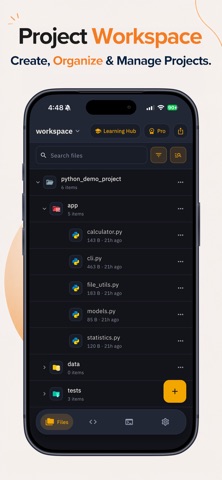
▸ REAL PYTHON PROJECTS
• Open folders as project roots
• Multi-file Python projects
• Import from Files, iCloud, or Drive
• Project search
• ZIP import and export
• Run configurations, arguments, and environment variables
▸ LEARN PYTHON BY CODING
• 100 Python lessons
• 84 coding challenges
• Easy, Medium, and Hard
• Worked solutions and progress tracking
• 18 examples and 25 standard-library modules
• Learn Python, NumPy, pandas, Matplotlib, SciPy, and scikit-learn
▸ DATA SCIENCE
Use Python for data analysis, scientific computing, visualization, and machine learning with NumPy, pandas, Matplotlib, SciPy, seaborn, SymPy, and scikit-learn.
▸ SSH & SFTP
• Saved SSH profiles
• Password or key auth
• SFTP upload
• One-tap re-upload
▸ PERSONALIZE YOUR EDITOR
• Dark and light themes
• 5 code themes
• Adjustable font and tab size
▸ FAQ
Q: Can I run Python offline?
A: Yes. The interpreter, editor, debugger, lessons, challenges, and examples run on your device. Internet is only needed for online features such as pip installation and SFTP uploads.
Q: Is this a real Python 3 interpreter?
A: Yes. It uses embedded CPython 3 with the standard library. Your code runs locally, not on a remote server.
Q: Can I run NumPy, pandas, and Matplotlib?
A: Yes. Supported scientific packages include NumPy, pandas, Matplotlib, SciPy, seaborn, SymPy, and scikit-learn.
Q: Can I install packages with pip?
A: Yes. Pro users can install compatible packages with pip. Pure-Python packages generally work; native packages require compatible mobile wheels.
Q: Does it include a Python debugger?
A: Yes. Use breakpoints, step debugging, locals, watches, call stack, expression evaluation, and exception handling.
Q: Can I build multi-file Python projects?
A: Yes. Open folders as projects, work with multiple Python files, search projects, import/export ZIP files, and configure how projects run.
Q: Can I learn Python from scratch?
A: Yes. The app includes 100 lessons, 84 coding challenges, examples, worked solutions, and progress tracking.
Q: Is my code private?
A: Your code runs locally and is not uploaded to our servers. Files leave your device only when you choose to share or upload them.
Q: What is free and what requires Pro?
A: Free includes a working Python environment, core coding, tutorials, challenges, and examples. Pro adds unlimited projects and files, unlimited packages, the debugger, and run configurations.
Write. Run. Debug. Learn Python anywhere — online or offline.
Privacy Policy: https://koderead.com/privacy-policy/
Terms of Use: https://www.apple.com/legal/internet-services/itunes/dev/stdeula/