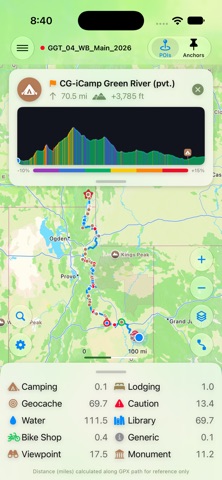
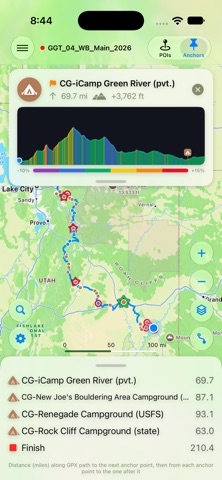
See how far and how much elevation it is to the next water, food, camp or bike shop, measured along your route.
POI Navigator is built by an avid explorer for the community. Open a GPX file exported from Ride with GPS. Every point of interest in it appears on the map, with a table showing the distance to the next one of each kind. No file yet? The built-in Oregon Outback demo route lets you try everything first.
PLAN YOUR TRIP
• Distance table: the next POI of every category, counting down as you move. Sort it your own way or by distance, and choose which categories to show.
• POI cards: key details, phone numbers and links, plus the distance and climb to get there, both from where you are and from your last anchor point.
• Goals: make any POI your goal and a banner shows the distance, climb and an elevation profile shaded by gradient all the way there.
• Anchor points: break a long route into daily legs. Each anchor is measured from the last, so you can see every day's distance at a glance.
• Simulate the route: nowhere near the start yet? POI Navigator can simulate riding it, so you can plan from home.
ON THE TRAIL
• Follow mode keeps your position centered and heading up as you move.
• One button cycles between your location, the whole route, the view to the next POIs, your goal and your next anchor point.
• Choose Explore, Satellite, Driving or Transit maps, in miles or kilometers.
• Get directions to the start of the route in Apple Maps.
• Reverse a route to ride it the other way.
MAKE THE ROUTE YOUR OWN
• Press and hold anywhere on the map to create your own POI, with an icon, a name and a description.
• Add places straight from Apple Maps as new POIs, filed under the right category.
• Suppress POIs you don't need. They stay on the map as a small red × and drop out of the tables.
• Save a modified copy with your goal, anchors and added POIs, and the POIs you suppressed removed.
• Export just the POIs or just the track as a standard GPX file for use in other apps.
• Unsaved changes are kept safe: if the app closes before you save, it offers them back next time.
FREE TO TRY
Everything works in simulation for free. POI Navigator Unlock, a one-time purchase for all your devices, adds your real GPS position plus saving and exporting. Family Sharing included.
PRIVATE BY DESIGN
Your location stays on your device. POI Navigator collects no data and has no accounts or ads.
Works on iPhone, iPad and Mac.