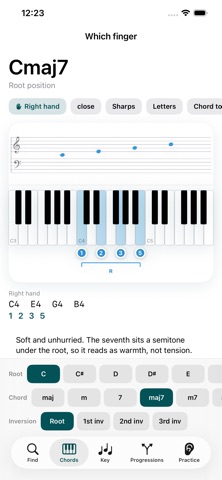
Pick a chord and see which finger presses which key.
The app is free. No subscription. No ads. No free trial.
We checked every piano chord app on the App Store. Not one puts finger numbers on
chords. So we built this.
[ WHAT MAKES THIS DIFFERENT ]
- Finger numbers 1-5, right under the keys, split into left hand and right hand.
- You choose the inversion. The app does not decide for you.
- Offline, with no server and no data collected.
[ WHAT CHORD IS THIS - press keys to find the name ]
- Press keys and the app names the chord. 288 chords: 24 qualities in 12 keys.
- Exact matches are separated from near ones, and enharmonics sit side by side
(C#m7b5 and Dbm7b5). Choose a key and the spelling follows it.
[ CHORD DICTIONARY - inversions and voicings ]
- 12 roots x 24 chord qualities. Root position, 1st, 2nd, 3rd inversion - you pick.
- Five voicings: close, drop2, drop3, shell, rootless.
- Keyboard and grand staff, always together. Never hidden.
- Note names (C D E) or solfege (do re mi). Hear it as a chord or arpeggiated.
[ KEY - the seven chords of a key ]
- Major and minor, triads and sevenths
- Roman numerals (I, ii, V7 ...)
- Tap a chord and the dictionary opens it with every inversion.
[ MIDI KEYBOARD ]
- Connect a USB or Bluetooth keyboard and we read what you play: the chord name and
the finger numbers appear together.
[ CHORD EXPLANATIONS ]
- One paragraph on why a chord is built the way it is, with plain distance before
jargon: "three semitones up" before "minor third". Pick a key and it adds the job
that chord does and what usually follows.
[ NEXT CHORD SUGGESTIONS ]
- Enter a few chords and the app suggests what comes next.
- Every suggestion says why: "used in 4536", not just a score.
- Measured over 852 transitions: the right scale degree was among the suggestions
97% of the time. No internet - it is all on device. Build your own by tapping
suggestions; change key and it follows.
[ PROGRESSIONS - write songs with them ]
- 20 progressions: 4536, 1564, 6451, ii-V-I, Canon, 12-bar blues and more.
- All 12 keys, triads or sevenths. Play, loop, or tap one chord to hear it alone.
- Voice leading: each chord takes the inversion your hand travels least to reach.
Measured across 20 progressions in all 12 keys: 45% less hand movement than root
position, and not one progression came out worse.
[ ALSO ]
- Chord tones on the keys (R 3 5 7) and figured bass (6, 6/4, 6/5, 4/3, 4/2).
- Small hands mode: fingering changes for 396 of 1,440 voicings, measured.
- Progression tempo control.
[ ONE HAND OR TWO ]
- Right hand alone, left hand alone, or both. The right hand puts the chord above
middle C with 1-3-5, the way method books teach it. Chords too wide for one hand
fall back to two, automatically.
[ ACCURACY ]
The music theory is locked down by 66 tests: key spelling, enharmonics, roman numerals,
staff positions, and the finger number for every inversion. Choose a key and every chord is
spelled by that key's signature.
[ WHAT THIS APP DOES NOT DO ]
- No microphone chord detection. You press keys to look a chord up.
[ A PROMISE ]
Everything that is free today stays free. It will not move behind a paywall later.
Available in English, Korean and Spanish.
Contact: tonbonami@gmail.com
[ WHAT IS FREE AND WHAT IS PRO ]
Free - reverse lookup, the whole chord dictionary (inversions and voicings), the
staff, keys and Roman numerals, one hand or two, small hands, chord tones, MIDI
input, chord explanations, and viewing, playing and looping all 20 progressions.
Pro - four things. 1. Your own progressions: next-chord suggestions with the reason,
and saving. 2. Ear training: hear a chord and name it. 3. Build a chord: read a name and
a position, then build it on the keyboard. It names the missing note.
4. MIDI export to Logic or GarageBand. Buy once. Not a subscription.
Inversions and voicings are free here. Other apps charge for them.