OCR Scanner — Turn Images into Text Instantly
OCR Scanner is a simple, fast scanning app that turns text from any document, note, receipt, book page, or screenshot into editable text in seconds — using your camera or a photo from your gallery.
No complicated settings, no sign-up. Scan, extract, share.
What you can do
• Scan or Import a Photo — Capture instantly with your camera or pick an image from your library.
• Smart Text Recognition — Advanced dual-engine technology recognizes text with high accuracy.
• Edit — Refine the recognized text in-app; change the font and size.
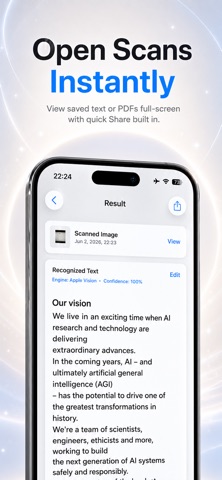
• Save as Text or PDF — Keep your scans as plain text or as a PDF document.
• Copy & Share — Copy the text with one tap or share it to other apps.
• Organize with Folders — Keep your scans tidy in custom folders.
• History — Access all your scans anytime; filter by All, Text, or PDF and search.
• English & Turkish support, with light/dark theme.
Your privacy is absolute
OCR Scanner is built so that everything you scan stays on your device.
• All scans, images, and recognized text are stored only on your device.
• We never collect, transmit, sell, or share your data.
• Text recognition runs fully on-device — your images never leave your iPhone.
• No ads, no tracking, no analytics.
• No account or sign-in required.
• Delete any scan at any time, permanently.
Carry your documents with you and turn paper into digital text in seconds.