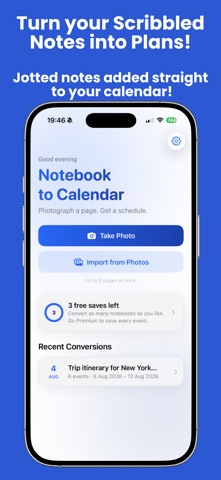
Photograph a page from your notebook. Get an organised calendar.
Notebook to Calendar reads your handwriting and turns it into real events for
Apple Calendar — working out the dates, filling in the times you didn't write
down, and showing you everything on a clean timeline before a single event is
saved.
Your handwriting doesn't need to be neat. Your notes don't need to be complete.
Half a line and a day of the week is usually enough.
HOW IT WORKS
1. Photograph your notes, or import pictures you've already taken. Up to eight
pages at once, cropped and straightened automatically.
2. The assistant reads the page and builds a schedule. If something genuinely
can't be worked out, it asks — briefly, and only when it matters.
3. Review everything, edit anything, then save to the calendar you choose.
IT UNDERSTANDS MORE THAN DATES
Meetings, appointments, birthdays, holidays, reminders, travel, school events,
sports, work shifts, shopping lists — anything with a time attached.
It resolves the shorthand people actually write: "Friday", "next week", "after
half term", "the first Saturday", "2pm", "appt", "mtg w/ Sarah", "b'day".
It recognises places and people, spots trips, and turns "gym every Tuesday"
into one repeating event rather than fifty-two separate ones.
SMART SUGGESTIONS
It doesn't just copy your notes out. It reads the whole day and offers to
improve it:
• Two meetings with no travel time between them
• A three-hour gap that could be lunch
• A sensible duration for an appointment with no end time
• An event that looks like it repeats
• A reminder you'd probably want
• Packing and preparation tasks before a trip
• Places to visit and eat when your notes show you're away
Every suggestion is optional. Nothing changes unless you tap it.
THE DAY PLAN
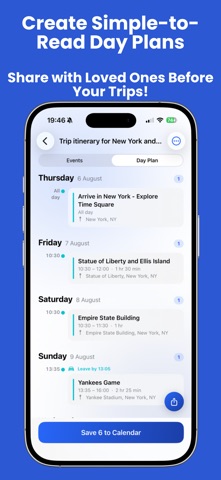
Before anything reaches your calendar, see it as a proper timeline — day by day,
with gaps, overlaps and travel time laid out plainly. Share it as an image if
you want someone else to check it.
YOU'RE ALWAYS IN CONTROL
Every event shows its date, time, location, notes, reminder, calendar, colour,
recurrence and travel time — plus how confident the assistant is. Anything it
was unsure about says so, and explains why. Edit anything before you save.
Choose which calendar events land in — Family, Work, Personal, whichever you
like. Save all of them or just the ones you pick.
FREE AND PREMIUM
Free: convert as many notebooks as you like, and save up to 3 events to your
calendar in total.
Premium unlocks:
• Unlimited event saving to Apple Calendar
• Unlimited notebook conversions
• Smart itinerary suggestions
• Travel recommendations and packing reminders
• Duplicate detection — replace or merge instead of doubling up
• Recurring event detection
• Future AI improvements
PRIVACY
Photographs of your pages are sent securely to an AI service to be read. We ask
for your agreement before the first scan, explain exactly what's sent, and you
can turn it off at any time in Settings.
The app never stores your photographs — only the events you create, and only on
your device. Please avoid photographing sensitive personal information.
SUBSCRIPTION
Notebook to Calendar Premium is offered as a weekly or annual auto-renewing
subscription. Payment is charged to your Apple Account at confirmation of
purchase. Your subscription renews automatically unless it is cancelled at least
24 hours before the end of the current period. Manage or cancel your
subscription in your Apple Account settings at any time.
Privacy Policy: https://angelapplications.co.uk/privacy-policy/
Terms of Use: https://angelapplications.co.uk/terms-of-use/
Terms of Use (Apple standard EULA): https://www.apple.com/legal/internet-services/itunes/dev/stdeula/
Questions or feedback: contact@angelapplication.co.uk