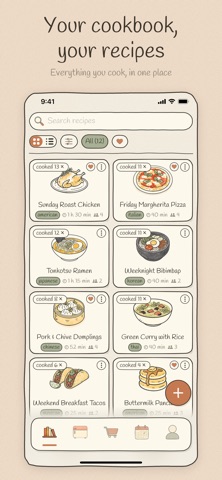
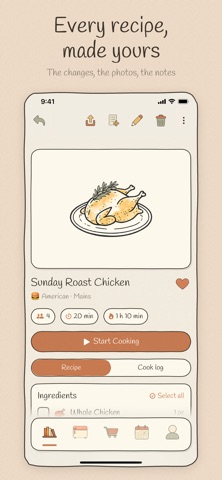
The useful part of a recipe is often what happens after you save it: the change you made, the photo from last time, the note that says ten more minutes in the oven. Nombook keeps the recipe and that history together.
Add a recipe in your own words or import it from a link, photo, cookbook page, recipe card, or handwritten note. Plan when to make it, send the ingredients you need to a grocery list, and use the recipe at the stove without wrestling with your phone.
ADD RECIPES YOUR WAY
• Write the title, ingredients, steps, and any notes you want to remember
• Paste a link or save a page from the built-in browser
• Scan one photo or a whole set of cookbook pages and notes
• Review and edit every import before it joins your cookbook
• Use your own cover photo, remove its background with one tap, or choose from 110+ hand-drawn dishes and drinks
• Pick from 200+ hand-drawn ingredient icons
MADE FOR THE MIDDLE OF COOKING
• Full-screen cook mode shows one clear step at a time and keeps the screen awake
• Check the ingredients before you begin
• Start a timer right from a step; it keeps running when you move on and alerts you when time is up
PLAN, THEN SHOP
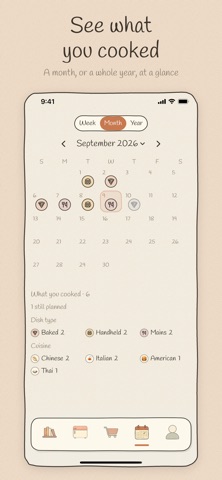
• Put recipes on a calendar and see the week at a glance
• Add every ingredient—or only the ones you're missing—to the grocery list
• Items are grouped by aisle, and matching ingredients from different recipes are added together
• Look back through a month or a year of home cooking
KEEP NOTES FOR NEXT TIME
• Add photos, a note, and a half-star rating each time you cook a recipe
• See exactly when you made it, what worked, and what you changed
• Search by recipe or ingredient, combine cuisine and dish filters, or browse collections you made yourself
• Choose what's in the fridge to find recipes you can make with it
SHARE A RECIPE
• Send a complete recipe as a link, including its ingredients, steps, photos, and notes
• Anyone who opens it in Nombook saves an independent, editable copy, so their changes never affect yours
• Prefer a picture? Share the recipe poster as an image instead
ON EVERY DEVICE OF YOURS, AND NOBODY ELSE'S
Your cookbook syncs through your own iCloud account, so one Apple ID opens the same recipes on every device you sign into. It goes to Apple's iCloud and never to us: there is no Nombook account and no Nombook server. Without iCloud everything still works, kept on the device. There are no ads, trackers, analytics, newsletters, subscriptions, or in-app purchases. Every feature is included.
AVAILABLE IN
English · 简体中文 · 繁體中文 · 日本語 · 한국어 · Español · Français