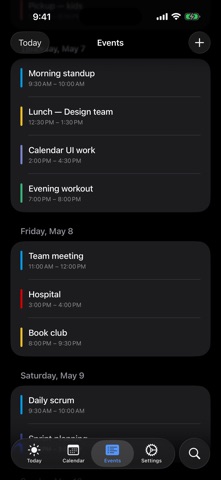
Every event at a glance — that's all minical does.
linked calendar, iCloud / iOS system calendars, and minical's own events — wherever they're created, they all land on one screen, color-coded. What's on today, how the rest of the month flows, all visible without scrolling.
■ At a glance
• Today screen — next-event countdown, ongoing, what's left, what's done
• Month view — the entire month in one grid, color patterns visible at a glance
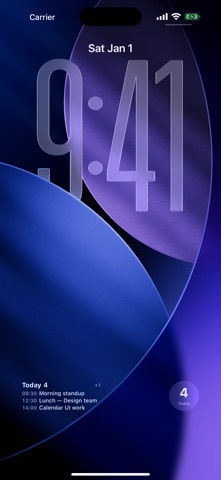
• Widgets — today + tomorrow without leaving the home/lock screen
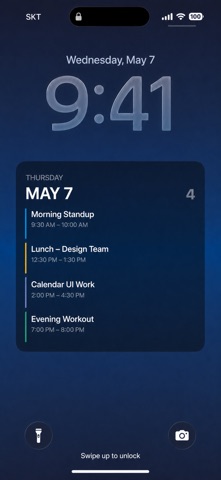
• Shortcuts — your lock screen wallpaper becomes today's schedule
• Apple Watch — at a glance from your wrist
■ Core
• iOS 26 native Tab Bar — Today / Calendar / Agenda / Search / Settings
• Month · Week · Day views — Month uses vertical paging with magnetic snap. Tap the year/month title to jump anywhere
• Two-way linked calendar sync — add / edit / delete writes back to linked calendar immediately. Multi-account
• Recurring events — daily / weekly / monthly / yearly with end conditions. Editing a series instance asks: this event only or the whole series
• Natural-language quick add — "tomorrow 3 PM meeting 1 hour"
• linked calendar's 11-color palette + brightness tones — long-press for shade variants
• Read-only iOS system calendars (iCloud / Exchange) blended in
• Multi-alarm (10 presets, stack as many as you want)
■ Full widget lineup
Home screen
• Up Next (Small / Medium) — bold when one event, compact rows when many. Long-press to filter calendars
• Today List (Medium / Large) — today first; tomorrow only when today has room to spare
• Month grid (Large)
Lock screen
• Inline (one line above the clock — timed events first)
• Inline Long (multiple events compressed)
• Rectangular (single event large, multi-event compact)
• Circular (today's count)
Apple Watch
• Native Watch app — quick view + quick add
• Four complications (Inline / Rectangular / Circular / Corner)
■ Auto-refreshing wallpaper via Shortcuts
• "Generate Today Wallpaper" Shortcut — chain it with the system "Set Wallpaper" action and a daily 7 AM automation, and your lock screen refreshes itself with today's plan
• "Save Today Wallpaper to Photos" — single-action variant
• Three styles: Gradient / Minimal / Dark
■ Promises
• No ads. No account required (linked calendar sync is optional). No tracking. No IAP.
• All data stays on-device. calendar account tokens live only in Keychain. No analytics or ad SDKs.
Scattered events on one screen — today at a glance.