KeepCue: Visual Timeline & Routine Planner
For those of us who need structure, routines, and flexibility in planning. Certain activities are best started with a cue, try beginning on cue instead of fixed clock time. Time block for overall structure, then act on cue to get things done.
## CUE-ANCHORED ROUTINES
You figured out a few things about yourself: the ten minutes of journaling to start your day right, the two-minute shutdown ritual that helps you transition out of work mode, the night routine that gets you to bed on time and prepared for the next day.
Let your cues guide you back on track. Instead of fixed times, anchor activities and routines to approximate time blocks plus something that already happens in your daily life, e.g., when you wake up, when you walk through the front door, when you close your laptop. These are all possibilities for anchors that provide structure without having to adhere to fixed clock times.
Why do routines matter? Your routine is a solution to a problem you've already solved. Now if you could just get it done on automatic, that'd make life easier. The morning routine that starts your day right, the afterwork routine that transitions you to home mode or a different role, the evening routine that gets you prepared for the next day.
The distance between planning and done is a cue: something that tells your brain the routine starts now, and gets you on your way to completing it. KeepCue provides 60+ cue ideas to get you started.
## VISUAL TIMELINE TO VIEW YOUR DAY
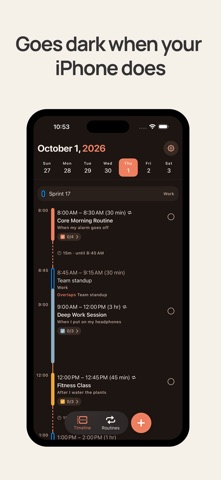
See your work and personal life at a glance. Your schedule and free time in one view: find the time you didn't know you had, fix an overlap you didn't intend, or swap an activity just for this week.
## VIEW YOUR CALENDAR EVENTS
View your existing calendar events on the timeline. KeepCue can import your existing calendars that your Apple Calendar app can access, including iCloud, Google, Outlook, Holidays, Birthdays, and subscribed calendars. KeepCue only reads your calendar, and it stays on your device.
Holidays, birthdays and all-day calendar events are shown at the top of the day on the timeline. Multi-day events are shown across multiple days.
## PRESET ROUTINES
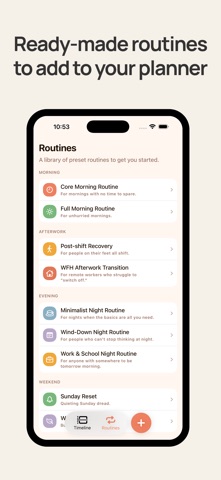
KeepCue comes with real, helpful routines for morning, afterwork, evening, and weekends.
Morning: Core, Full morning routine
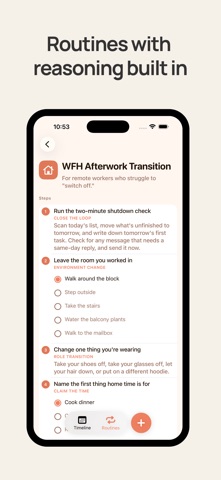
Afterwork: WFH Transition, Post-shift Recovery
Night: Minimalist, Wind-down, Work & School
Weekends: Sunday reset, Weekend Recovery
Easily add ready-made routines to your planner.
## ADD NEW ACTIVITIES
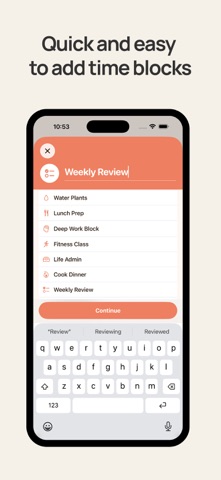
Add activity name, date, and duration. Make it recurring and anchor it to a cue. Add a checklist and notes.
## BREAK IT INTO STEPS
Break anything overwhelming into a checklist of smaller steps and check them off one by one.
## COMPLETE ACTIVITIES
Choose how completed activities look: a color tint, dimmed, or a strikethrough line.
## DARK MODE
Dark mode. KeepCue goes by your iPhone's setting, whether Light or Dark mode. Customize by going to Settings > Display & Brightness on your iPhone.
## REMINDERS
Get a reminder when an activity is about to start, or 5, 10, 15 or 30 minutes before. Reminders cover your KeepCue activities only, not your calendar events. There are no activity reminders until you turn notifications on.
Tapping a reminder opens activity details. Completing an activity clears its reminder.
## KEEPCUE
Built for iOS. One-time purchase, lifetime access. No sign up. No subscription.
## SUPPORT
Questions or feedback? Reach out at support@keepcue.app