Some notes are worth a folder and a title. Most are not. JKST Note is for the other kind —
the thought, the todo, the expense, the password you just made up — captured in seconds and
then left alone.
Tap the plus, pick a type, type, save. No folder to choose, no title to invent, no screen to
navigate afterwards. The loop is capture and done.
CAPTURE WITHOUT A DETOUR
Start a new note from Control Center, the Lock Screen, or the Action button. Or say "Jot
this in JKST Note" to Siri; five spoken shortcuts open the same capture form. Use the share
sheet to send a webpage, selected text, or image into JKST Note. Attach a photo from your
library or take one with the camera, or record audio for an on-device transcript.
NOTES WITH A SHAPE
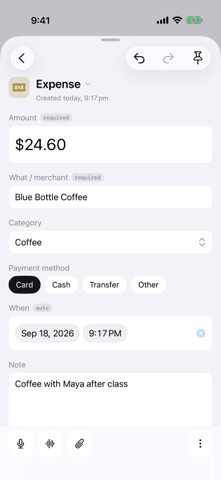
A note here is a small typed card rather than a blank page. Seven types come built in — Jot,
Todo, Log, Account, Expense, Contact, Link — each with its own fields, and you can invent
your own on the phone: add a field, choose its kind, mark it required, prefilled, or secret.
Editing a type never rewrites the notes you already captured.
SECRETS THAT STAY SECRET
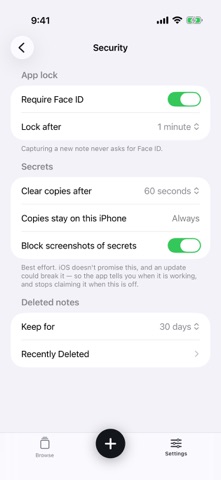
Mark a field secret and its value is encrypted on your iPhone, shown as dots, and left out
of search. Revealing it or copying it takes a fresh Face ID check every single time, however
recently you unlocked the app. A revealed value re-hides after ten seconds. A copied one
clears itself from the clipboard, and never travels to your Mac or iPad.
Write down the six-word recovery code and a lost phone does not mean lost secrets. Skip it
and your secrets live and die on this iPhone. The app tells you that plainly instead of
burying it.
NOTHING LEAVES YOUR PHONE
No account. No server. No analytics. JKST Note makes no network requests at all, so there is
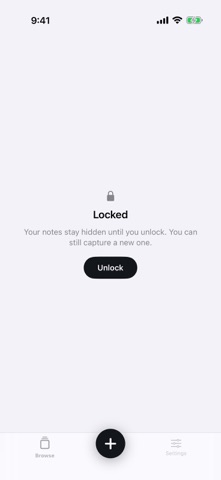
nowhere for your notes to go. The whole app sits behind Face ID, and the app switcher shows
a cover instead of your notes.
FIND IT LATER
One reverse-chronological stream, filter chips per type, and full-text search across
everything you captured — except your secret values, which are never indexed. Deleted notes
wait thirty days in Recently Deleted before they go.
THE NAME
Jot, Keep, Search, Trust. Also Jot, Keep, Secure, Type. Between them they name the five
things this app is about, which is more than four letters usually manage. And, simply: Just
keep stuff together.
Requires iOS 18. iPhone only.