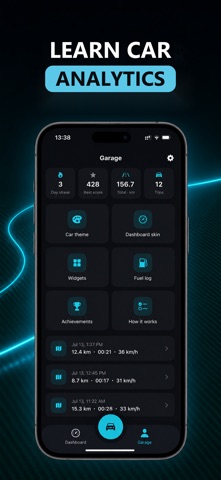
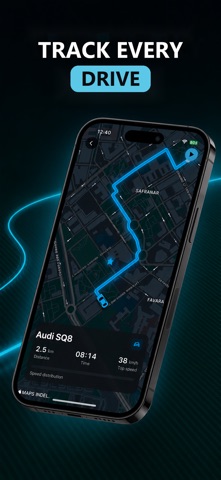
DriveDeck turns your iPhone into a real car dashboard: a live GPS speedometer, a drive-mode HUD, automatic trip logs, car sounds and 15+ Home & Lock Screen widgets, all styled to match your car.
SPEEDOMETER & DRIVE MODE
• Live speed from GPS, in km/h or mph
• Drive Mode: full-screen speed, map and Apple Music controls in one view
• HUD: giant digits that reflect off your windshield, with a mirror toggle for night driving
EVERY TRIP, RECORDED
• Distance, time, average speed and route, updated live
• Trips keep recording in the background, even if the app is closed
• Hands-free: start and end trips on their own when your iPhone connects to CarPlay or your car's Bluetooth
• Your current trip on CarPlay (iOS 26) and Apple Watch
• Drive log, drive score and personal records
CAR SOUNDS
• 60+ clips for connecting, disconnecting and arriving home
• AI Sounds: your car greets you by name. Pick a voice, a language and a phrase, or write your own
• Plays by itself in the car after a one-time setup in Shortcuts
WIDGETS THAT RIDE WITH YOU
• Speedometer, last trip, drive stats, drive log, records and drive score
• License plate, dial and HUD clocks, brand logo, my car card and your own photo
• Editor to reframe, add captions and stickers
• Lock Screen widgets: one tap from your Lock Screen to driving
YOUR PERSONAL AI WIDGET
• Pick your car and a photo of you, and AI renders a one-of-a-kind widget
• Cinematic, Neon or Showroom styles, ready to share
MADE FOR YOUR CAR
• Pick your brand and the dashboard takes on its colors
• A dark carbon-and-cyan look designed for the road
• No account, no sign-up
• Available in 21 languages
PREMIUM
DriveDeck is free to start. Premium unlocks all car sounds and AI Sounds, your personal AI widget, every Home & Lock Screen widget, the drive-mode HUD and all car themes.
• Subscriptions: weekly and yearly options
• Payment is charged to your Apple ID at confirmation of purchase
• Subscriptions renew automatically unless auto-renew is turned off at least 24 hours before the end of the current period
• Your account is charged for renewal within 24 hours prior to the end of the current period
• Manage or cancel anytime in your App Store account settings
• Terms of Use: https://www.apple.com/legal/internet-services/itunes/dev/stdeula/
• Privacy Policy: https://blowy.tech/CarWidgetsPrivacyPolicy.html
Questions or feedback? support@blowy.tech