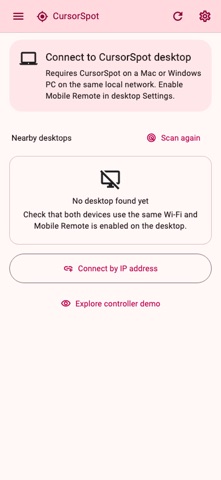
Control your computer's pointer highlights from your iPhone or iPad. CursorSpot is a companion controller for presentations, lessons and demonstrations where the audience needs to see the desktop pointer clearly.
REQUIRES CURSORSPOT ON A COMPUTER
CursorSpot must be running on a Mac or Windows PC on the same local network. Enable Mobile remote on the computer and approve pairing there. Pointer effects appear on the computer, not over other apps on your iPhone or iPad. This is not an internet remote-desktop service.
HIGHLIGHT AND MARK
• Trigger a highlight to draw attention to the desktop pointer.
• Show or hide the desktop marker and control its lock state.
• Switch between pointer presets already configured on the computer.
FIND AND RETURN
• Move the pointer to a display center or a saved desktop jump location.
• Return it to its previous location within 10 seconds of a remote jump.
• Use the controller to bring the CursorSpot desktop window back into view.
PAIR OVER YOUR LOCAL NETWORK
• Discover a nearby CursorSpot computer or enter its address manually.
• Compare the six-digit pairing code and approve the connection on the computer.
• Reconnect to a saved computer without repeating initial pairing.
• Use the labeled in-app demo to explore the controls without sending commands to a computer.
CONFIGURE ON THE DESKTOP
Create and edit marker styles, presets and saved jump locations in CursorSpot on the computer. Desktop shortcuts, start-at-login options and settings import/export are configured there, not in the iOS controller. CursorSpot does not emulate a general-purpose trackpad or keyboard and does not stream the desktop screen.
FREE AND PRO
All pointer-control features remain available in Free. After the trial, mobile Free may show ads. Pro removes mobile ads and upgrade prompts. Lifetime and yearly options are available in the app, along with Restore Purchases.
Terms of Use: https://kakitiro.com/quickapps/quickcursorspot/terms/