StoreIntel
AppsTop ChartsTrendingKeywordsMy Apps
Not affiliated with Apple Inc. App Store is a trademark of Apple Inc.Top chartsSupportTermsPrivacy

Counter for Watch

Mishima Design · Utilities · 11.5y old

Free
◆ ProTrack this app App Store

Performance · Worldwide

Est. downloads / month · WW

<5K

Below chart threshold

Est. revenue / month · WW

<$5K

Below chart threshold

Rating · WW

4.1★

23 ratings

Chart position

Rank history — US · Top Grossing

Apple's Top Grossing chart — all apps ranked by revenue (purchases + subscriptions).

Top FreeTop Grossing

Ratings count — US

23
◆ Pro1 chart locked

See the numbers behind the rankings

  • Keyword RankingsWhich App Store searches it ranks for, and where
Unlock everything

Listing

About

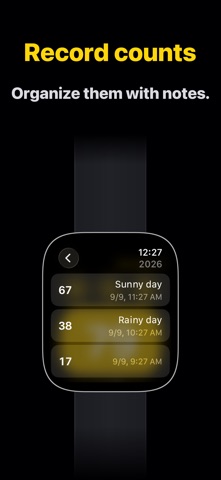
A simple counter app for Apple Watch. Use it for golf strokes, knitting rows, headcounts, workout reps, fish caught, and anything else you want to tally quickly. Just tap the large button to count. You can also undo a count or clear the current counter. Customize each counter with a title and color. Switch between counters with a swipe. Save the current value and review it later with the date, time, and a note. Once you purchase Counter Plus, you can add counters and save records without limits. Counter supports complications and Smart Stack, so you can show counters on your watch face. Haptic feedback and Double Tap are also supported. Double Tap lets you count by lightly tapping your index finger and thumb together twice. Haptic feedback and Double Tap can be turned off in settings. Note: Counter requires watchOS 10 or later on Apple Watch. Double Tap is available on supported devices with watchOS 11 or later. Terms of Use: https://apps.mishimadesign.com/counter/legal.html#terms-en

Released
Apr 24, 2015
Category
Utilities
Content rating
4+
Price
Free
In-app purchases
No
WWUSGBDEJPINBR

No chart data

No rank history yet for this selection.

→

Screenshots

4
Counter for Watch screenshot 1Counter for Watch screenshot 2Counter for Watch screenshot 3Counter for Watch screenshot 4