TimeFeel makes time visible.
Count down to the days you're waiting for — trips, birthdays, weddings, exams — or count up from the moments that changed everything, and see exactly where you stand at a glance.
Countdown & Count-up
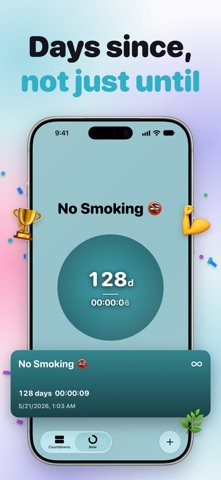
Create a countdown for any event, or count up from any date. Switch between "time left" and "time passed" to see time the way you want.
Repeating countdowns
Birthdays, anniversaries and paydays roll over on their own. Repeat daily, weekly, monthly or yearly, or build a rule as flexible as Reminders — the second Tuesday of every month, the last day of the month — with an optional end date.
Import from Calendar
Pick the events you want from your calendar and turn them into countdowns in a tap. Nothing is added until you choose it.
Holiday ideas
Start from New Year, Christmas and other yearly dates without typing a thing.
A live clock everywhere
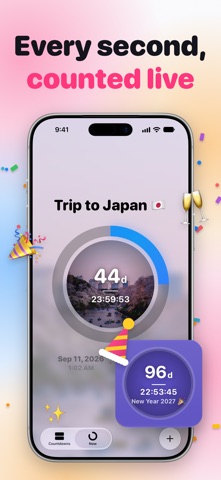
Countdown cards, widgets, the Lock Screen and Apple Watch tick in real time — days first, then hours, minutes and seconds.
Open-ended timers
No end date needed. Track how long something has been going — a habit, a journey, a chapter of your life — without setting a finish line.
Progress at a glance
Every countdown shows how much of its span has passed, as a ring or as a percentage of time done or left.
Custom colors & photos
Pick an accent color for each countdown. With Plus, use your own photo — it becomes a soft, blurred full-screen backdrop.
Smart notifications
Every countdown tells you when it ends. Add reminders a set number of days before or after, or when a percentage of the time has passed.
Widgets on every screen
Home Screen widgets in two sizes, plus Lock Screen widgets — a ring, or a line right under the clock. Your countdown is there before you unlock.
Apple Watch
The full app on your wrist, plus complications for your watch face — your next countdown sits right on the dial.
Live Activities
When a countdown enters its last stretch, it appears on the Lock Screen and in the Dynamic Island — photo and all — and keeps ticking there until it's done.
Find any countdown
Search by name and group your countdowns by year or month.
iCloud sync
All your countdowns sync automatically across your iPhone, iPad and Apple Watch via iCloud.
Plus
Unlock photo backgrounds, unlimited countdowns, advanced notifications and new app icons — monthly with a free first week, or a one-time purchase that's yours forever.
Terms of Use (EULA): https://www.apple.com/legal/internet-services/itunes/dev/stdeula/