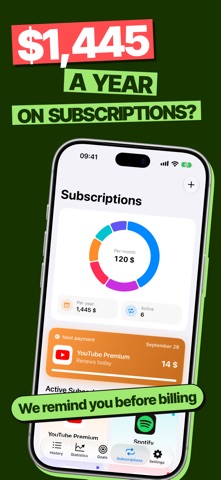
Sound familiar? Payday hits, and a week later you have no idea where it all went. Some subscription got charged that everyone forgot about. A loan sitting in one app, a debt to a friend buried in Notes, cashback that never lands on the right card.
CoinBox grew out of exactly that mess. It started as a quick way to track my own spending, and little by little, everything else moved in too.
The main thing is that logging an expense shouldn't feel like a chore. So you can just say: "coffee 5, taxi 18, lunch 15." All three get logged at once - the AI figures out the category, amount, and currency on its own. It understands natural speech in 30+ languages. If you'd rather type it in, there's a keyboard with a built-in calculator.
Where the money goes
• Category breakdowns and comparisons with last month
• An AI spending audit: it looks at the last 3, 6, or 12 months and honestly shows where your money is leaking, which subscriptions you don't need, and what budget you can actually stick to. It only runs if you give it the go-ahead
• "What you could've bought" - the most sobering screen in the app. Small purchases over a month or a year turn into cups of coffee, movie nights, sometimes even a car. You can turn any of these into a savings goal right away
Making it last till the end of the month
• A daily limit shows how much you can still spend today. Don't spend it all and the rest rolls over to tomorrow; go over and tomorrow's a little tighter
• A short evening summary tells you how much you saved compared to a typical day
• Budgets by category and savings goals
Subscriptions, loans, and debts
• All your subscriptions in one list. If you've started a trial somewhere, CoinBox reminds you before the first charge, so you don't end up paying for something you don't use
• Loans and mortgages with a full payment schedule. You can calculate early repayment - shorten the term or lower the payment. Set up an installment purchase right when you add the expense
• Debts: who owes whom, by when, and how much's already been paid back. If a friend forgets, you can send them a polite nudge
• Upcoming payments show right in the widget
Making your money work
• Cashback: add your cards and this month's categories, and the app tells you which card to use
• Investments: crypto, stocks, ETFs, real estate, and deposits in one portfolio, with prices updating on their own
• Accounts in different currencies: cards, cash, savings
• Income too, so you see more than just what's going out
While traveling
• Travel mode: spend in the local currency and everything converts automatically
• Up to 5 extra currencies, with an exchange rate you can adjust by hand
And the small things that make life easier
• Widgets for every taste, including the lock screen, plus a Control Center button for logging an expense fast
• Custom categories, tabs, and app icons
• Search by notes, amounts, and dates
• Notifications that adapt to your rhythm
• Import and export to CSV and Excel, plus backups
I build CoinBox alone, so I really do read every message. If something's missing or you've got an idea, reach out through "Ask a Question" in settings. A lot of what's in the app today started out exactly that way.