Turn one long video into short clips worth posting.
You filmed something long: a podcast, a livestream, a lesson, an interview. You need short vertical clips for TikTok, Reels and Shorts. Finding the good parts by hand takes hours.
Clipolette does that part for you. It finds the best moments, frames them vertical, adds captions, and gets them ready to post.
HOW IT WORKS
1. Add a video from Photos or Files.
2. Tap Find best moments (some videos get them right away).
3. Tap a clip to open it.
4. Add captions, export, and post.
One long video becomes a short list of clips, best one first.
IT FINDS THE BEST MOMENTS
• Pick a target length: 15, 30, 60 or 90 seconds.
• Clipolette finds the moments worth posting from what is said, and from laughter, applause and cheering. On videos over 30 minutes with camera cuts, it goes by pacing and sound, and tells you.
• Each clip says why it was picked. Most are rated Strong, Good or Worth a look, and many get a label like Hook, Insight or Laugh.
• Nothing stood out? It tells you, instead of inventing a favorite.
• Rather choose yourself? Videos with camera cuts are split into scenes. Keep the ones you want, drop the rest.
IT FRAMES THE SHOT FOR YOU
• Clips open framed on the face it found. Two people far apart? Use Follow Subject.
• Follow Subject keeps the person in frame as they move, and switches to whoever is talking when two people share the shot. No face on screen? It follows the action, so gameplay stays centered.
• Want the whole shot? Blurred Fill keeps all of it, on a soft blurred background.
• Or pan and zoom by hand.
• Safe zones show where TikTok, Reels and Shorts put their buttons.
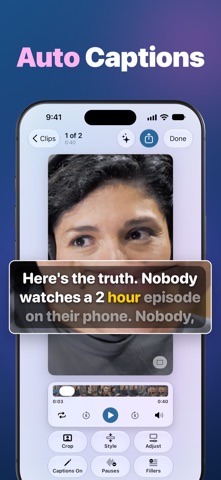
CAPTIONS IN ONE TAP
• Automatic captions in English, highlighted word by word.
• Five ready-made styles, or your own color and size.
• Fix any line, add or delete captions, translate them, or replace a word everywhere at once.
CLEAN IT UP
• Pauses: cut the dead air. Captions stay in sync.
• Fillers: cut the "ums" and "uhs".
• Trim any scene with its waveform.
• Slow motion: half or quarter speed. Slowed scenes play silent.
• Enhance sharpens soft, low-resolution footage. It shows up when your video and device can use it.
READY TO POST
• Exports a vertical 1080 x 1920 video.
• Post Kit: once your clip has captions, it writes an on-screen hook, a title, a caption and hashtags. Put the hook on the video, copy the rest.
• Projects save on their own, so you can come back for the next clip.
PRIVATE AND FREE
• Everything runs on your device. No account. Nothing is uploaded.
• Every tool is free. No subscription.
• One payment removes the watermark from your exports. Pay once, keep it forever.
Works with any video where people talk in English: podcasts, interviews, livestreams, sermons, webinars, lessons, vlogs and gameplay. Already have a short clip? That works too.
WHAT YOU NEED
• iPhone with iOS 18 or later, or iPad with iPadOS 18 or later.
• Finding best moments, Post Kit's written text, saved projects, Enhance and smoother slow motion need iOS 26 or iPadOS 26.
• Finding best moments and Post Kit's written text also need Apple Intelligence on your device. Finding moments needs a video with speech. Without Apple Intelligence, you still get your video's scenes to keep, drop or trim by hand.
• Captions and finding moments work in English, with Apple's on-device speech model. Clipolette adds it, or tells you where to add it in Settings. Your audio stays on your device.
• Keep Clipolette open while it works. Locking your device can stop it.