Chores & Allowance Bot is an easy and versatile way to keep track of your family chores, allowance, and savings goals.
New in version 5:
• Completely rebuilt: faster and smoother.
• Apple Watch app: kids see and check off their next chore on their wrist.
• Add a child's iPhone, iPad or Apple Watch with a 6-digit code, with no need to share your password.
• Widgets for your Home Screen and Lock Screen: kids check off their next chore right from the widget.
• Siri and Shortcuts: "What's my next chore?", check off a chore, record a purchase or a deposit, and more.
• A new Help box: ask a question and it shows you, step by step, where to tap.
• Tips, dark mode, and desktop widgets on Apple silicon Macs.
Features:
• Manage all chores for your family from a single view.
• Add as many children, allowance, and chores as you want.
• Automatically sync chores, allowance, multiple accounts, and history for your family across all your devices.
• Children can add a photo to each completed chore.
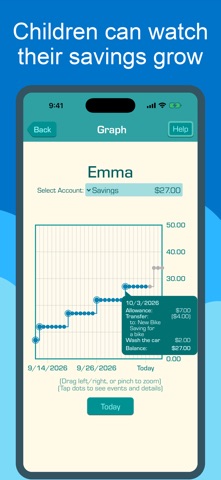
• Unlimited history in the Graph view -- the history of savings, spending, and chores activity.
• Ledger view shows unlimited account history.
• Chore Chart shows all assigned chores for all children for multiple weeks.
• Create Up-For-Grabs chores that can be assigned to multiple children, but can only be done by one child.
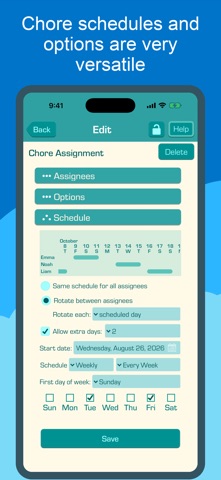
• Rotate chores between children on a daily, weekly, or monthly schedule.
• Optional Child passcodes protect each child's chores list from siblings, and allows them to change their own photo or avatar.
• Keep chores in child's chores list for extra days if not done on the first assigned day.
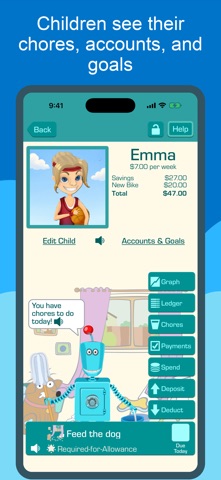
• Unlimited additional accounts and goals for each child.
• Automatically transfer a percentage of allowance and chores payments into separate accounts and goals.
• Advanced reminders with settable time of day, and notifications for many events.
• Automatically approve allowance payments based on required chores.
• Optionally approve partial allowance payments based on difficulty of chores completed.
• Set up daily, weekly, or monthly allowance.
• Assign chores to multiple children.
• Ledger shows history for allowance payments, reward chores payments, and other transactions.
• Chores can be one time chores and reassigned any time, or chores can be repeated on a daily, weekly, or monthly chores schedule.
• Choose whether allowance accrues automatically or only after parental approval.
• Deduct money from children accounts when they spend money.
• Easily withhold any number of future allowance payments as punishment.
• Supports several pretend currencies like Points, Smiley Faces, Federation Credits & more.
• Children can create their own avatar, or use a photo to personalize the app.
• Chores can have photos to help children understand what needs to be done.
• Receive reminders when you forget to approve allowance or chores payment.
• Pre-readers can have chores names, chores descriptions, allowance and savings amounts read aloud to them by the app.
• Approve or unapprove allowance and chore payments.
• Optional parental passcode stops children from making changes without permission.
• Parents can set chores reminders at specific times of the day and press a button to send chores reminders at any time.
• Change the order children are displayed in the main screen.
• Change the order chores are displayed in each child's todo list.
• Configure the visibility of each child on your devices.
https://www.apple.com/legal/internet-services/itunes/dev/stdeula/


 +4
+4