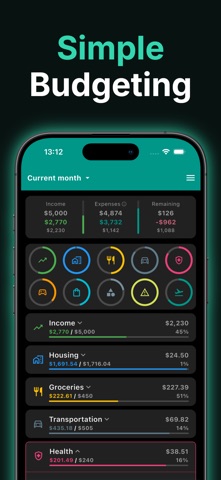
Budgetum is a flexible budget planner and expense tracker that helps you plan your money, track spending, and understand where it actually goes — without a rigid system.
Plan a monthly budget or create a custom budget period, like a pay cycle. Add categories that match your real life. Track expenses, bills, subscriptions, and income. Compare your plan with what really happened.
WHY BUDGETUM
Flexible budget planning
Plan by month, by pay cycle, or by any custom date range. Create your own sections and categories instead of adapting to someone else's system. Copy last month's plan forward in one tap.
Expense and spending tracking
Log expenses, income, and transfers. See planned vs. actual in real time. Split a single purchase into item-level entries with receipts to know exactly what you spent on.
Bills and subscriptions
Set up recurring transactions for rent, utilities, streaming services, salary, savings transfers, and any other repeating activity. Budgetum reminds you to confirm them so nothing slips through.
Multiple accounts and transfers
Track cash, bank, cards, savings, and debt accounts. Move money between accounts without distorting your budget. Keep savings clearly separated from spending.
Analytics and reports
See breakdowns by category, section, account, contact, or tag. Switch between pie chart and trends view. Pick any period — this month, this year, all time, or a custom range.
Bank statement import
Import a statement for one account and match rows to your existing transactions. Useful for monthly reconciliation without giving up control of your data.
Contacts, tags, and saved sets
Add optional context about who you paid or why. Save reusable filters for the analyses you run again and again.
Offline and privacy-first
Budgetum works fully offline. No account required. No bank connection required. Your data stays on your device.
Calm by design
No aggressive warnings. No "you're doing it wrong" messages. No paywall blocking the core budgeting flow — the essentials stay free. Budgetum Pro adds advanced tools and supports ongoing development.
WHO BUDGETUM IS FOR
• Anyone who wants a simple, flexible budgeting app
• People tracking monthly income, expenses, and bills
• Users moving from spreadsheets, notes, or paper
• Students, families, freelancers, and professionals
• Anyone who wants to understand their money without a forced method
BUDGETUM HELPS YOU
• Plan a budget that fits your life
• Track expenses, income, and transfers
• Organize bills, subscriptions, and savings
• Understand your spending habits
• Stay consistent month after month
Download Budgetum and start planning your budget today.