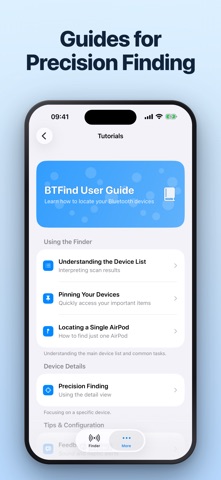
# FIND LOST EARBUDS, HEADPHONES, AND DEVICES
BTFind scans for the Bluetooth devices around you and shows how close each one is. Walk toward it, watch the reading rise, and find what you misplaced.
# SEE EVERY DEVICE IN RANGE
Every Bluetooth device nearby appears in one list with a live reading. Pick the one you are looking for and start tracking it.
# TRACK IT AS YOU GET CLOSER
The closeness reading updates as you move, and a history graph shows whether you are getting warmer or colder. Sound and vibration can tell you the same thing without looking at the screen.
# PIN WHAT YOU TRACK OFTEN
Pin the devices you look for most and they stay at the top of the list, above everything else in range.
# CHOOSE YOUR UNITS
Read distance in metres or feet, whichever you think in.
# WHAT IT FINDS
- AirPods, and Bluetooth earbuds, earphones and headphones
- iPhone, iPad, and Apple Watch
- Portable speakers and smart devices
- Fitness trackers and smartwatches
# HOW TO USE IT
1. Open BTFind and let it scan.
2. Choose the device you are looking for.
3. Move around and watch the reading rise.
4. Follow it until you have it in hand.
# WORTH KNOWING
- The device has to be powered on and in Bluetooth range to appear.
- Start looking before the battery runs out — a device that is off cannot be found.
- Closeness is an indicator derived from signal strength, not a measured distance. It moves with orientation and with anything standing between you and the device.
- BTFind is not affiliated with any company named here. AirPods and Apple Watch are trademarks of Apple Inc.
# SUBSCRIPTIONS AND AUTOMATIC RENEWAL
- Your subscription includes access to the features listed above.
- Payment will be charged to your Apple ID Account at confirmation of purchase.
- Subscription automatically renews unless auto-renewal is turned off at least 24 hours before the end of the current period.
- Your account will be charged for renewal within 24 hours prior to the end of your selected subscription period.
- Subscriptions can be managed and auto-renewal turned off in your App Store Account Settings.
# LEGAL
Terms of Service: https://cooptimizeit.com/terms-of-service
Privacy Policy: https://cooptimizeit.com/privacy-policy
# SUPPORT
Contact us at info@cooptimizeit.com. We reply within 48 hours.