A simple background editing app that automatically detects people and objects, making it easy to remove and customize photo backgrounds.
Simply choose an image from your Photo Library, Files, or Camera, and the app will automatically make the background transparent.
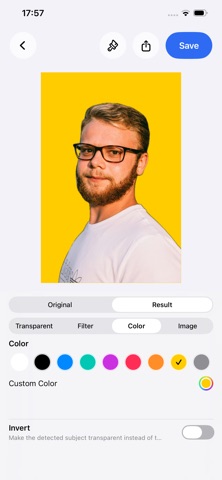
In addition to removing the background, you can replace it with a color or another image, or apply effects such as blur and mosaic.
Whether you want to cut out a person, remove the background from a product photo, change the background to white or another color, or blur only the background, simply select an image and start editing.
You can also fine-tune the automatic cutout using a brush.
Erase additional unwanted areas or restore parts that were removed by mistake, giving you more control over the final result.
● MAIN FEATURES
【Automatic Background Removal】
・Automatically detects people and objects
・Automatically makes the area outside the subject transparent
・Supports photos containing multiple people or objects
・Create images with transparent backgrounds
・Quickly switch between the original image and edited result
【Customize the Background】
・Make the background transparent
・Set any color as the background
・Use a photo or image as a new background
・Choose a background image from your Photo Library
・Import a background image from the Files app
・Remove or replace the selected background image
【Background Effects】
・Background blur
・Horizontal motion blur
・Vertical motion blur
・Diagonal motion blur
・Zoom blur
・Monochrome
・Noir
・Sepia
・Mosaic
・Crystal effect
・Poster effect
・Halftone
・Comic effect
・Sketch effect
・Edge effect
・Hue-shift effects
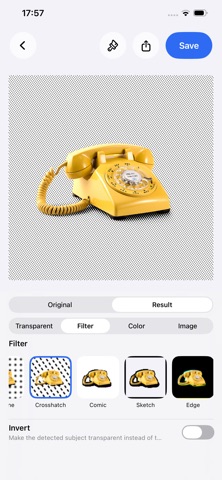
・Crosshatch and other effects
【Fine-Tune with a Brush】
・Manually adjust the automatic background removal result
・Erase additional unwanted areas
・Restore areas that were removed by mistake
・Adjust brush size
・Undo and redo edits
・Pinch to zoom in and out
・Use two fingers to move the image while editing fine details
【Invert Subject and Background】
・Normally makes the background transparent
・Invert the selection to make the subject transparent instead
・Create cutout-style effects using the subject area
・Switch which area becomes transparent depending on your needs
【Choose from Photos, Files, or Camera】
・Browse images from your Photo Library
・Switch between albums to find photos
・Import images from the Files app
・Take a new photo with the Camera
・Zoom and crop photos after taking them before editing
【Save & Share】
・Save edited images to your Photo Library
・Save PNG images while preserving transparency
・Share via AirDrop, Mail, Messages, and more
・Export to the Files app and other apps using the share menu
【Simple and Easy-to-Use Editor】
・Compare the original image and edited result with one tap
・Choose from Transparent, Filter, Color, or Image backgrounds
・Preview filters with thumbnails before applying them
【No Login or Registration Required】
・Start using the app immediately without creating an account
・Background removal and image editing are processed directly on your device
・Edit your photos without uploading them to an external server
From transparent backgrounds, background removal, and photo cutouts to background colors, image replacement, blur, mosaic, and other effects, you can handle a wide range of background editing in one simple app.
Perfect for people, product photos, profile pictures, social media images, and many other types of photos.
A simple and convenient background editor for everyday image editing.