Bring your old clips back to life and make every moment look like it was shot on a flagship phone. This app is built for anyone who’s tired of blurry memories, shaky recordings, or social posts that don’t look as good as they felt in real life. With an ai video enhancer that works in a few taps, you can finally stop settling for “good enough” and start sharing videos you’re proud of..
Whether you’re polishing travel footage, family videos, or content for Instagram and YouTube, this ai video editor helps you upgrade fast without the learning curve. From cleaning noise to improving clarity, the goal is simple: help you video enhance your stories so they feel as vivid on screen as they are in your mind.
Key Features
One-Tap Video Quality Enhancer
Use the video quality enhancer and video resolution enhancer to sharpen details and improve overall clarity without complicated settings.
From HD to Stunning 4K
Turn older recordings into crisp visuals with hd to 4k video and easily upscale video to 4k for a modern, premium look.
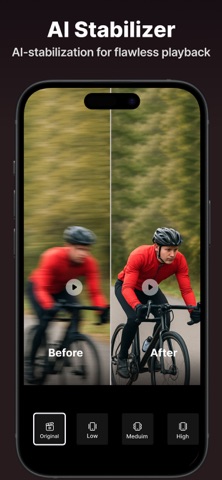
Stabilize Shaky Footage
The video stabilizer smooths handheld clips so your action shots and walking videos look steady and professional.
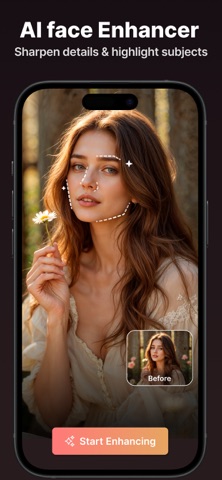
Face Detail Recovery
Restore portraits and close-ups with the ai face enhancer, ideal for vlogs, interviews, and family moments.
Quick Cut Tools for Creators
Trim fast with the video trimmer and make precise edits using the video cutter when you’re building short-form content.
Optimized for Short Content
Create platform-ready edits with a reels video editor and a shorts video editor tailored for punchy, scroll-stopping storytelling.
All-in-One Editing Workflow
This ai video editing app combines essential enhancements with an ai video editing tool so you can go from rough clip to ready-to-post in minutes, backed by a reliable video enhancer.
If you want cleaner, sharper, more share-worthy videos without wasting hours, this is the simple upgrade your camera roll has been waiting for. It’s built for real life—low light birthday clips, quick travel reels, old family recordings, and last-minute content that still deserves to look amazing.
Open the app, enhance your video, and share with confidence.
Subscription Terms
- Subscribe to get unlimited video enhancer app access to all features.
- Upon confirmation of purchase, the payment will be charged to the iTunes account.
- Until you turn off the auto-renew at least 24 hours before the end of the current.
period it will be automatically renewed.
- If you decide to turn off auto-renewal, you can turn it off maybe by going to account settings after purchase.
-The renewal amount will be charged from the account within 24 hours before the end of the current period.
-As per the policy, cancellation of the current subscription is not allowed during the active subscription period. Once purchased, refunds will not be returned for any unused portion of the subscription period.
Terms of use - https://www.outthinkingindia.com/terms-of-use/
Privacy policy - https://www.outthinkingindia.com/privacy-policy/