Enlarge photos, enhance detail, and retouch portraits with AI Enlarger. Give small images more room on screen, refine your favorite portraits, or create a new look with color presets and LUTs.
Choose offline AI processing on your device or online enhancement tools. From a single photo to a batch of images, you control the model, scale, and finishing touches.
AI IMAGE UPSCALING
- Enlarge photos and anime artwork at 2x, 4x, or 8x, where supported.
- Choose from three offline models: Fast, Sharp, and General. Compare results to find the look that suits your image.
- Preview the original and processed image before saving.
- Prepare larger images for wallpapers, creative projects, and sharing.
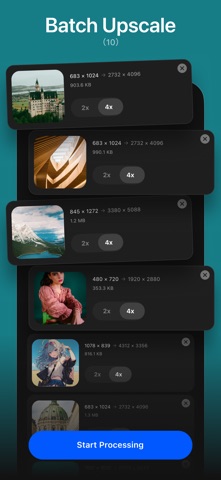
BATCH UPSCALING
- Import up to 10 images at a time and upscale them at 2x or 4x.
- Use offline AI models to process photo collections, illustrations, and product images on your device.
- Follow each image's progress and save your results without repeating the same steps for every photo.
PORTRAIT RETOUCHING
Make subtle changes or build a more polished portrait with adjustable controls:
- Smooth skin, adjust brightness, balance skin tone, and lighten facial shadows.
- Refine eye brightness and sharpness, eyebrow detail, and lip color.
- Adjust eye size and face width to suit your preferred look.
- Compare before and after as you edit.
COLOR, LIGHT, AND CREATIVE LOOKS
- Explore presets and LUT filters, then adjust their intensity.
- Combine a preset with manual adjustments and a LUT to make the look your own.
- Balance exposure, contrast, highlights, shadows, whites, and blacks.
- Fine-tune white balance, temperature, tint, saturation, vibrance, and hue.
- Adjust sharpness, clarity, noise reduction, dehaze, fade, and vignette.
- Use online AI enhancement and sharpening tools when you want another processing option.
ONLINE OR OFFLINE: YOUR CHOICE
Offline upscaling processes images on your device without uploading them for enhancement. Online tools upload your image and require an internet connection. Check online tasks and available results in History.
Available scales and output sizes depend on the tool, input image, and device resources. Large images may be resized for processing. Retouch and adjustment exports are limited to 2048 pixels on the longest edge. Results vary with the source image and selected settings.
PREMIUM OPTIONS
Some features require an in-app purchase or credits. Premium options include monthly and yearly subscriptions and a one-time lifetime purchase. See the app for current prices and plan details.
Choose a photo, compare your results, and find the right finish with AI Enlarger.
Support: support@imglarger.com
Website: https://imglarger.com
Privacy Policy: https://imglarger.com/blog/privacy-policy/
Terms of Use: https://imglarger.com/terms/