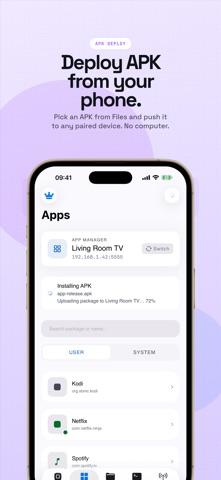
Want to upload files to your smart TV, only to find that tvOS doesn’t have a file manager?
Want to install third-party apps on your TV, but can’t find a way to do it? Ever run into situations where you don’t have a USB drive, or your TV OS doesn’t support sideloading?
Don’t want to carry an extra remote, and just want to control your device with your phone?
This app is built exactly for you.
ADB Link is a professional, efficient, and well-designed ADB control tool, compatible with smartphones, tablets, and smart TVs.
It can automatically discover your devices and allows you to connect via QR code or manual input. If your device supports it, you can even connect with a single tap. With multiple connection methods and built-in guides, getting connected is simple and reliable.
ADB Link offers a wide range of features, including but not limited to:
1. Install apps remotely without relying on the device’s app store. No more USB drives or traditional file transfer methods.
2. Powerful file management that lets you manage files on your TV like on a phone, including remote file upload.
3. Smart remote control — replace your physical remote entirely.
4. Developer-level tools such as shell terminal, screen mirroring, logs, and ADB commands.
Designed with your needs in mind, ADB Link aims to be your best ADB companion.
If you have feature requests, encounter any issues, or are not satisfied with any part of the app, feel free to contact us via the in-app email. Your feedback is highly valued and helps us improve continuously.
Unlock additional features by upgrading to Premium.
Premium Plans & Pricing:
• $0.99 per week*
• $1.99 per month*
• $19.99 per year*
• $29.99 one-time purchase (lifetime)*
*Prices are displayed in USD. Final charges may vary depending on your local currency and region.
Payment will be charged to your Apple Account upon confirmation of purchase. Subscriptions renew automatically unless auto-renewal is disabled at least 24 hours before the end of the current billing period.
Your account will be billed for renewal within 24 hours prior to the end of the current period, with the renewal price clearly displayed beforehand.
You can manage or turn off auto-renewal at any time in your Account Settings after purchase. Active subscriptions cannot be cancelled during the current billing cycle.
If a free trial is offered, any unused portion will be forfeited once a subscription is purchased.
Privacy Policy: https://sites.google.com/view/adblink/privacy-policy
Email: developer_emma@163.com
EULA: https://www.apple.com/legal/internet-services/itunes/dev/stdeula/