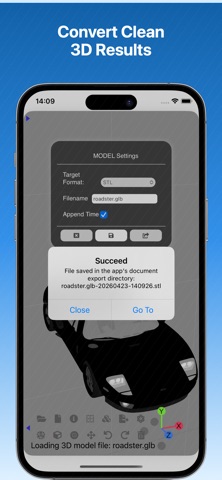
3D Model Viewer & Converter helps you inspect parts, slice cross sections, generate orthographic views, and export clean results across macOS, iPad, and iPhone. It works offline, keeps your files local, and is built for engineers, makers, designers, and 3D file users who need a lightweight way to review models before converting, exporting, or sharing them.
Key Features
• Import a wide range of 3D and point cloud formats, including 3MF, STL, FBX, OBJ, GLB, USDZ, MPD/LDR, DAE, TDS, AMF, LAS, PLY, PCD, XYZ, VOX, VTK, VTP, and DXF
• Review a model information summary after loading, with quick access to format, file size, object/mesh/point counts, triangles, dimensions, materials, and textures
• Inspect internal geometry with XY, XZ, and YZ cross sections, including automatic scan slicing and manual control of slice positions
• Use exploded view to separate model components, inspect multipart assemblies more clearly, focus or pin individual parts, and export selected exploded parts to clean 3D files
• Generate orthographic projection outputs — including front, top, and right views — in SVG format
• Export clean 3D results to STL, OBJ, GLB, USDZ, and GLTF
• Batch convert multiple source files — even across different model formats — into one target format in a single workflow
• Capture model screenshots for export or sharing
• Manage recent files with individual deletion and one-tap clearing to keep the entry point tidy
• Basic editing tools: move, rotate, scale, delete, and undo changes to model objects
• No ads. No tracking. No data collection. Just a clean, efficient workflow tool built for serious 3D review and output tasks.
Pricing & Access
• Free: Open and inspect models
• Subscription: Unlock advanced inspection, conversion, projection export, and sharing workflows. A single subscription covers macOS, iPhone, and iPad.
• Individual Unlocks: Permanently unlock the specific export and workflow tools you need — no subscription required.
• Payment is charged to your App Store account.
• Auto-renews unless turned off 24 hours before the current period ends.
• Manage subscriptions in App Store settings.
Privacy & Purchase Terms
• Privacy Policy: https://apps.h53d.xyz/apps/3d-model-viewer/policy.html
• Terms of Use (EULA): https://www.apple.com/legal/internet-services/itunes/dev/stdeula/
Have questions or need support? Reach out to danjian42@gmail.com.