Something has broken on your server and your laptop is at home. Open WriteAccess, connect, fix it, and get on with your day.
WriteAccess puts a real SSH terminal, a file editor that saves straight back to your server, and live server stats on your iPhone and iPad. It is free: no account, no subscription, no ads.
FIX IT IN THE TERMINAL
• Real SSH shells, several at once over one connection.
• A row of keys above the keyboard for Esc, Ctrl, Tab and the arrows. Choose the keys you want, in the order you want.
• Tap the command line to put the cursor exactly where you need it.
• Press and hold to copy output. Paste in from anywhere.
• Drag to scroll back through output. Pinch to zoom.
• It remembers the commands you use and suggests them as you type.
EDIT FILES WHERE THEY LIVE
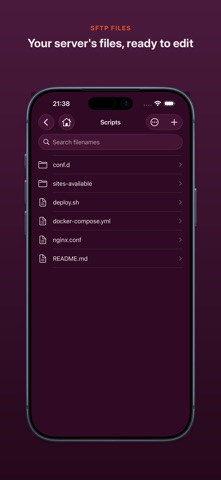
• Open a config over SFTP, change it, save. It goes straight back to the server, with nothing to sync.
• "Saved" means the server confirmed it. If a server cannot promise a safe overwrite, the file opens read-only rather than risk your data.
• Browse, create, rename, delete and search your server's files.
• Edit files in the Files app as well, from iCloud Drive or On My iPhone, with Markdown highlighting. Unsaved work survives an interruption.
SEE WHAT YOUR SERVER IS DOING
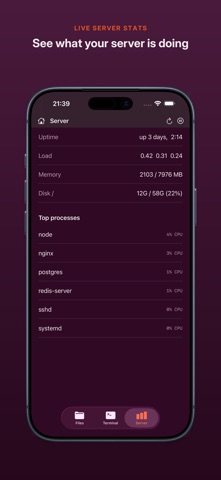
• Uptime, load, memory, disk and the busiest processes, live.
• Spot the problem, fix it in the terminal, and watch the load come down.
DRIVE YOUR CODING AGENT FROM YOUR PHONE
• Save a start-up command for each server and open a terminal straight into your AI coding tool, or any command-line tool. It runs on your server, with your code, at your server's speed. You just steer.
BUILT FOR iPAD TOO
• Files, terminal and server stats side by side on a divider you can drag.
• Landscape, multitasking and hardware keyboards all work.
SAFE BY DESIGN
• WriteAccess connects to your servers and nothing else. No middleman, no tracking, no analytics.
• Sign in with a password, an SSH key (encrypted keys included) or your server's interactive prompt.
• Host keys are checked on every connection. If one changes, nothing connects until you say so.
• Passwords and keys stay in the iOS Keychain on your device. Your server list can follow you to your other devices through your own iCloud; passwords and keys never do.
• See which servers you are connected to at a glance, and disconnect with one tap.
GOOD TO KNOW
Sessions close when you leave the app, so it is for hands-on work rather than watching long jobs. Sign-ins that need a second code after the password are not supported yet.
For your VPS, homelab, NAS, build server, or the machine your coding agent lives on. Download WriteAccess and keep your servers in your pocket.