Create, edit, read, sign, scan, convert, and organize DOCX and PDF files—all in one focused document workspace.
Whether you’re polishing a document, signing a PDF, scanning paperwork, or managing files on the go, Word Editor gives you practical tools in a clean, mobile-friendly experience.
EDIT DOCX DOCUMENTS
• Create and edit DOCX files
• Format fonts, sizes, colors, alignment, and spacing
• Add bullets, numbered lists, checklists, links, and images
• Cut, copy, paste, undo, and redo with ease
• Find and replace text in seconds
• Export your finished document as DOCX or PDF
SIGN AND MARK UP PDFS
• Read PDFs with smooth zoom and full-screen viewing
• Create, save, place, move, and resize signatures
• Highlight, underline, strike through, and draw freely
• Add shapes and redaction marks
• Undo edits and export PDFs with visible annotations
CONVERT AND SCAN
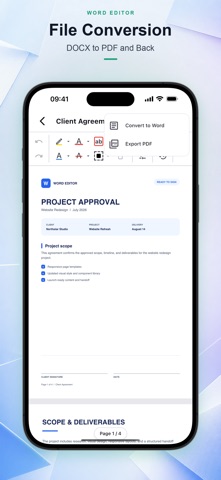
• Convert DOCX files to PDF
• Convert PDF files to editable DOCX documents
• Scan paper documents with your camera
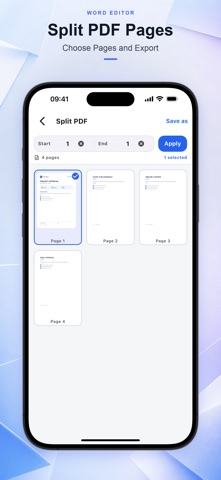
• Combine multiple photos into one PDF
• Reorder images before creating your PDF
ORGANIZE YOUR FILES
• Quickly search your document library
• Access recent and favorite files
• Filter DOCX and PDF documents
• Sort files and switch between list and grid views
• Rename, delete, print, and share documents
• View useful file information whenever you need it
MADE FOR EVERYDAY DOCUMENT WORK
Word Editor brings essential writing, PDF, scanning, signing, conversion, and file-management tools together in one convenient app—so your documents are always ready when you are.
SUBSCRIPTION
Some premium features require an auto-renewable subscription. Payment will be charged to your Apple ID account when your purchase is confirmed. Your subscription renews automatically unless canceled at least 24 hours before the end of the current billing period. You can manage or cancel your subscription in your App Store account settings.
Privacy Policy: https://docs.google.com/document/d/1SZDg4zhZNE1Y8EV79h5_P8azrwSLYZh_F-R8qOjMSq8/edit?usp=sharing
Terms of Use: https://www.apple.com/legal/internet-services/itunes/dev/stdeula