Join more than 200,000 workplaces running on When I Work to reduce chaos, costs, and turnover with employee scheduling and time tracking for the modern workforce. When I Work is an employee scheduling app that does more than just save you time on scheduling. It also helps you improve communication, eliminate excuses, boost accountability among your staff, track time and attendance, and grow your business.
“2026 Shortlist” - Capterra
“2025 Category Leader” - Getapp
"Fastest Implementation" - G2 Crowd
MANAGERS LOVE IT:
• Easy to use time clock to clock in and out
• Message with staff 1:1 or in groups
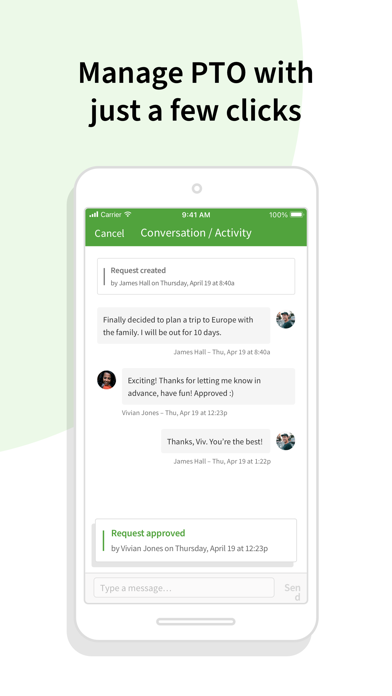
• Monitor and approve shift trades and time off requests
• View the entire staff schedule anywhere at anytime
• Create a work calendar to efficiently plan schedules
• Quickly alert staff of changes and updates to the schedule
• Messaging and scheduling permissions for easier management
• Geofencing features to prevent buddy punching
EMPLOYEES LOVE IT:
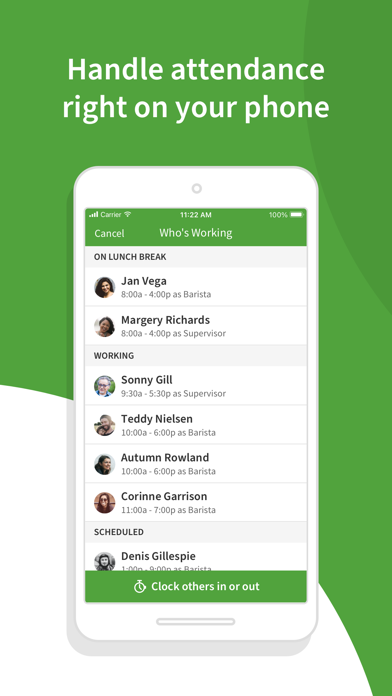
• Clock in and out of shifts from the app
• Instantly trade shifts with coworkers
• View work schedules from anywhere at anytime
• Pick up extra hours with open shifts
• Check the work calendar to easily request time off
• Privately message coworkers 1:1 or in groups within the app
• Easily check who's working which shifts
WHEN I WORK FEATURES:
When I Work is employee-focused and built exclusively for shift-based workplaces. We monitor our systems 24/7/365 to give you and your employees peace of mind that your data is safe and secure. Choose When I Work to get the best in:
• Team management - Onboard new employees, approve time off requests, review shift trades, and fill shifts in seconds.
• Team accountability - Shift confirmation, mobile clock in, shift task lists, team task lists, and chat ensure everyone is on the same page.
• Team communication - Notify your team of changes instantly and communicate with coworkers 1:1 or in group chats.
• Team empowerment - Your team can manage availability, submit time-off requests, and collaborate on shift trades.
• One-click scheduling - Build your entire work schedule in one click with Auto Scheduling.
• Confident shift coverage - Receive shift confirmations from employees and be notified immediately of swaps and drops.
• Share schedules - Publish the schedule and your whole team is instantly notified of their shifts.
• Labor forecasting - Easy-to-use labor tools help you manage your labor budget efficiently.
• Control overtime costs - Get overtime alerts and labor reporting to make managing labor costs easier.
• Schedule enforcement - Limit clock ins to shifts and locations to ensure that everyone is where they need to be at the right time.
• Payroll integration - Import your timesheets to quickly and accurately process payroll.
• Labor reports - Use labor distribution to manage costs and forecast for the future.
Terms of use: https://wheniwork.com/terms
Privacy policy: https://wheniwork.com/privacy