Weight Calendar puts every weigh-in where you can see it: on a calendar, one number under every date. No dots, no checkmarks. The actual number, every day, so a month of effort fits on one screen.
The number pad is already on screen when you open the app, so a weigh-in takes about three seconds. No limit on records, and the core features are free. Apple Health sync, 144 stamps, graphs, goal line and BMI, meal photos, 81 color themes, a home screen widget, reminders, CSV export, kg or lb, and 34 languages.
● A CALENDAR THAT SHOWS THE NUMBER
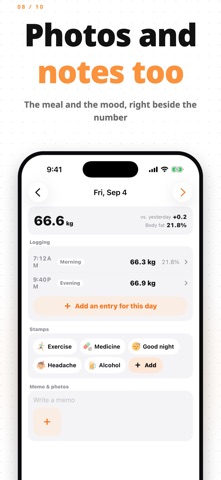
Every day shows its weight. Log more than once and it shows the average (or the latest or morning value). Swipe to turn months, or tap the month name to jump anywhere. The change for this week and this month sits right above the grid. One tap on a date opens that day's details: every entry with its time, stamps, a note and a photo, or four with Premium.
● THREE SECONDS TO RECORD
Open the Log tab and the number pad is already waiting. Type the number and save. Each entry keeps its time, so logging at night never overwrites the morning. Tap the date to add an entry for yesterday.
● 144 STAMPS, AND WHAT THEY DO
Eight categories, all free. Keep the ones you use most in Favorites. On the graph screen, each stamp shows the average change in your weight the next morning. You see which habits actually move the number, in your own data instead of a hunch.
● GRAPHS THAT ANSWER THE QUESTION
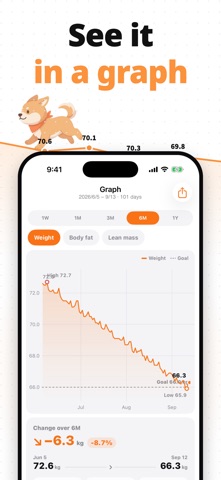
A week or a month, and three months to a year with Premium, scrolling through your whole history. Weight, body fat or muscle mass, with the goal line and the lowest and highest points marked. One card below the graph sums up the period: total change, average, pace and days logged.
● APPLE HEALTH
Read weight, body fat and lean body mass from Apple Health. Step on a smart scale, open the app, and one tap makes the new reading today's record. Entries you type can be written back to Health, including edits and deletions. Syncing is optional.
● MAKE IT YOURS
81 color themes, from simple white and black to Shiba Inu, cat and rabbit mascots, pastel and dark. The whole calendar changes, not just an accent color. About 150 background images, each with a matching palette, and custom themes from a single color.
● WIDGET AND REMINDERS
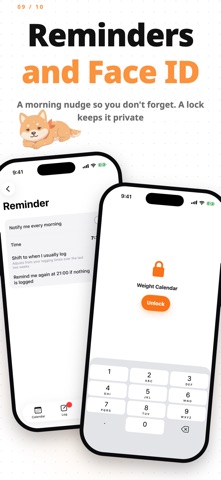
"Today's weight" on your home screen shows today's entry and your streak; a tap opens the number pad. A reminder in the morning, and again at night if you have not logged yet. Both are optional.
● YOUR DATA STAYS YOURS
Records are stored on your device, and the app never sends them to a server. Export CSV whenever you like. With Premium, lock the app with Face ID or Touch ID and import CSV from another app.
● PREMIUM
An optional plan:
- No ads
- Every theme, background image, custom themes, and the cat and rabbit mascots
- Goal forecast, and graphs over three months, six months or a year
- Weekly review card you can share
- Four photos a day, Face ID lock and CSV import
Monthly or yearly subscription, or a one-time lifetime purchase. Everything else is free.
Payment is charged to your Apple Account at purchase. Subscriptions renew automatically unless canceled at least 24 hours before the end of the current period. Manage or cancel in your App Store account settings. The lifetime purchase does not renew.
● FAQ
Q. I weigh myself several times a day. Which number does the calendar show?
A. The average, by default. Choose latest or morning under Settings > Logging.
Q. Can I move my records from another app?
A. Yes. Import a CSV file under Settings > Export / import (Premium).
● Terms of Use (EULA)
https://dkit.jp/en/terms/
● Privacy Policy
https://dkit.jp/en/privacy-policy/
● Support
https://dkit.jp/