The #1 viral digicam app on TikTok.
Yes — this is the one you saw.
You know the look: hyper-saturated colors, direct flash, and that perfectly imperfect feeling that proves something actually happened in the room. People used to get outbid on eBay chasing an overpriced G7X. Now, it just lives in your phone.
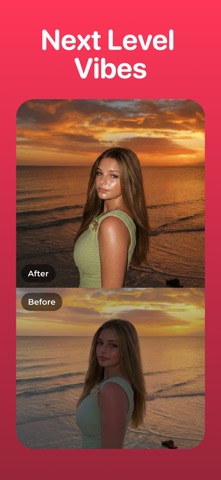
WayShot is an aesthetic photo editor and camera app for bold direct flash, rich color, subtle grain, warm portraits, and timeless black-and-white photography. Choose a camera style for the scene, then shoot or edit in a few taps.
FIVE CAMERAS. FIVE DISTINCT LOOKS.
DIGICAM — AFTER-DARK ENERGY
Bold flash, visible grain, saturated color, and a perfectly imperfect digital-camera feel. Made for nights out, parties, concerts, and late-night memories.
DIGILITE — VINTAGE COLOR IN DAYLIGHT
Lighter grain, warm color, and no-flash ease for travel, beach days, group photos, and casual photo dumps.
CLEAN GIRL — WARM, SOFT PORTRAITS
Soft-looking skin, balanced exposure, and golden-hour warmth for outfits, coffee runs, brunch, and everyday lifestyle photos.
B&W — TIMELESS MONOCHROME
High contrast, deep texture, and atmospheric black-and-white tones for portraits, street photography, and visual storytelling.
PROCAM — CLEAN, POLISHED FINISH
Refined color and crisp detail for profile photos, creator portraits, and editorial-style images.
WHY WAYSHOT
- Vintage digital camera and film-inspired looks
- Direct-flash, grain, warm color, and monochrome styles
- Shoot with the camera or edit photos from your library
- Clear camera choices for different lighting and moods
- Fast, one-tap workflow designed for iPhone
- Made for Instagram posts, photo dumps, portraits, travel, and everyday memories
FIND THE LOOK FOR THE MOMENT
Going out? Start with DigiCam.
Shooting in daylight? Try DigiLite.
Want a warm portrait? Pick Clean Girl.
Need a timeless frame? Go B&W.
Polishing a profile photo? Choose ProCam.
A single filter cannot fit every memory. WayShot gives each moment its own camera feel—without a complicated editing process.
Stay in the moment. Find your camera in WayShot.
User License Agreement (EULA): https://www.apple.com/legal/internet-services/itunes/cn/terms.html
User Service Agreement: https://www.wayshot.ai/terms.html
Privacy Policy: https://www.wayshot.ai/privacy.html
If you have any usage problems or good suggestions during use, please feel free to contact us. We look forward to providing you with a better experience:
- Email us: wayshot_feedback@romangic.com
- Join our Discord: https://discord.gg/AtgB5rPtPd
- TikTok: @wayshot_app
- Instagram: @wayshot_app