WanderWay finds covered bridges, scenic overlooks, and historic sites along your drive, then guides you there on iPhone and CarPlay. Hear stories about the places you pass, add a scenic detour, and keep a journal of your drives. No subscription, no ads, and no tracking. Built by Derek Boyer, a solo developer in Southern Ohio. WanderWay was inspired by my wife Jordan's wish for an app that reveals the history and beauty along everyday routes.
Choose a destination, build a multi-stop route, or generate a Sunday Drive loop, then follow spoken turn-by-turn directions.
FREE TO TRY, ONE PURCHASE TO KEEP
• Free to download, with every feature open for a 14-day free trial. The trial doesn't renew and never charges you.
• One-time unlock: keep navigation on iPhone and CarPlay, Story Mode while you drive, narration without a route, Scenic Detours, curated drives, offline downloads, and searches up to 40 miles. No subscription.
• Always free: nearby places within 5 miles, place details and photos, destination search, and route previews.
• No ads and no account. WanderWay keeps no location history or routes on a server, never sells personal data, and saves your Road Trip Journal on your iPhone.
STORY MODE & SCENIC DETOURS
• Story Mode: as you approach a place, hear a short story about it, or tap "Listen to the story" on its page. With Apple Intelligence, stories are written on your iPhone from the place's description. Other iPhone models read a shortened description.
• Narrate Without a Route: hear nearby places and their stories on any drive, even without directions.
• Scenic Detours: spend 10, 20, or 30 extra minutes on up to three sights along your way, favoring US scenic byways. See the extra driving time on a map before you add them.
SUNDAY DRIVES & SCENIC ROUTES
• Generate a scenic loop or a curated drive to a destination, from 30 minutes to 5 hours
• Stay Within: set how far the drive can wander from where you start
• Weather-aware: the forecast and National Weather Service alerts, favoring indoor stops when rain or snow is expected
• Favor US scenic byways (dashed green on the map) and prefer backroads
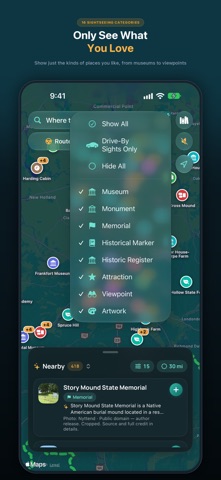
• Prioritize any of 16 categories, from covered bridges to castles, or show only sights you can enjoy from the road
• Search up to 40 miles (60 km) around you, or drop a pin anywhere
KNOW BEFORE YOU GO
• Descriptions and photos from Wikipedia and Wikimedia Commons, plus Apple Look Around or Mapillary street views
• National Park Service hours, fees, and alerts, Recreation.gov trailheads and tours, and National Register listings
• Opening hours, with a warning if a stop will be closed when you arrive
• EV charger status and cost from Open Charge Map
ROAD TRIP JOURNAL & PASSPORT
• Each drive you navigate is saved with the roads you drove, the places you passed, and the states or provinces you crossed
• Show the photos you took on each drive, from your own library
• Share a picture card of any drive, with its route map, stats, and places
• Passport: stamps for 15 kinds of places, milestones, and a Home Screen widget
ON THE ROAD
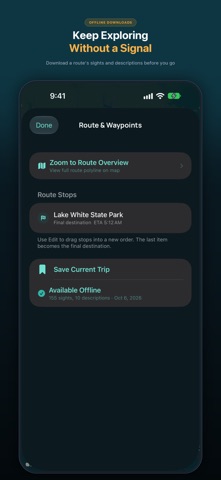
• Offline downloads for places without cell service
• Your next turn and the next place ahead on the Lock Screen and in the Dynamic Island
• Widgets and a Control Center button to start a Sunday Drive
EXPLORE WITH CARPLAY
• Start a drive from search, a saved trip, a favorite, or by voice
• Nearby sights with detour times, and a place's story
• A WanderWay map card on CarPlay Dashboard, with Nearby Sights and Where to? shortcuts
• Show Route Overview to see the rest of your drive
• A map and turn details in the instrument cluster, in cars that support it
• If the car's built-in navigation takes over, resume your drive with one tap
AVAILABLE IN FOUR LANGUAGES
English, German, French, and Spanish.
BUILT BY AN INDIE DEVELOPER
Feedback or route ideas? Email me at wanderwaysupport@gmail.com.
Derek
Drive attentively and follow traffic laws. Set your route before you start.