Wallet Creator is an easy-to-use card creation app that lets you build your own cards and add them to Apple Wallet. A membership card, a customer card or a ticket from your favourite local band — Wallet Creator lets you add and edit your own Apple Wallet cards easily, any time.
"It's the best addition to the Apple Wallet out there. It's great."
NEW IN THIS VERSION
• Universal app: a two-pane editor on iPad and the unfolded iPhone Duo, with the card preview always in view
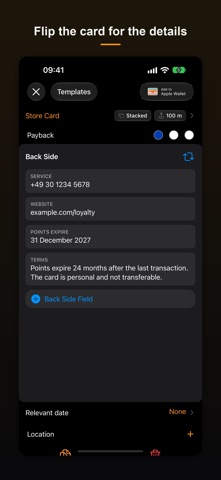
• Flip a card over to edit its back side, just like Apple Wallet shows it
• 80+ ready-made templates for well-known loyalty, store and travel cards — search for a brand, tap it once, and logo, colours and card type are set up for you
• Save a card you designed yourself as your own template and reuse it any time
• A redesigned home screen and card editor that follow Apple Wallet, with a true WYSIWYG preview of the finished pass
• Native EAN-13, Code 39, Codabar and ITF barcodes on iOS 27, with an automatic image fallback on earlier versions
• A searchable help section covering card types, colours, locations and more
• Now available in 12 languages
WHAT YOU CAN DO
• Add, organise and geolocate your own cards of any kind
• Change the look and the details of a card even after it is in Apple Wallet
• Custom background, label and value colours so you can tell your cards apart at a glance
• Store cards, coupons, event tickets, boarding passes and generic cards
• Optional locations bring a card to the lock screen when you are nearby
• A relevant date surfaces event tickets and boarding passes exactly when they matter
• A free-form back side for terms, service numbers or long membership numbers
• Your cards stay in sync across your devices via iCloud
BARCODES
• Rendered by Apple Wallet itself: QR, Aztec, PDF417 and Code 128
• Native from iOS 27 on: EAN-13, Code 39, Codabar and ITF
• Drawn onto the card as an image on older systems, so they still scan at the till
• Scan a code with the camera or pick a photo from your library
Crypto QR codes also make receiving crypto payments easier than ever (warning: never scan your private key!).
Our Terms of Use & Privacy Policy:
Apple Wallet only accepts a card signed with our certificate. The app therefore builds the card on your device and sends only checksums of the card's files, encrypted, to our server in Germany (HostEurope) – texts, barcodes and images never leave your device. Only as a fallback, for example on devices without Apple App Attest, is the card itself sent encrypted and deleted from the server straight after signing.
If you have further questions on data processing, please contact us at dataprivacy@at2-software.com
Learn more about at² GmbH and our software at www.at2-software.com