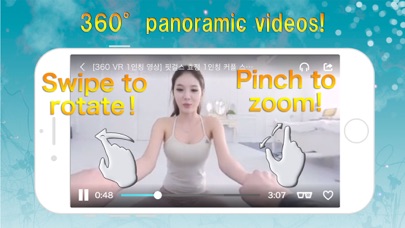
VRTube is a VR-specialized video app that supports viewing 360-degree videos and 3D VR videos.
VRTube is a virtual reality video app that provides many high quality VR entertainment to enjoy. You can use various VR glasses or headsets for true VR entertainment experience. Maybe you prefer the cardboard version. Some people prefer electronic version such as Oculus. You can even watch VR videos without glasses with this app. There are many kind of video, jump into games, horror movies, dive into ocean, watching sharks, girls, and roller coasters, etc just for your entertainment. These are all 360° panorama video that will give you immersive experience.
Features
- 360 degree virtual video only
- Compatible with 3D panoramic video
- Compatible with multiple headset (Cardboard, Gear VR, Daydream View)
- VR mode for headset
- Touch and gyro controlling
- Zoom in / zoom out
- Continuous playback
- Search suggestion · search history
- Side menu
- Social share (Twitter, Facebook)
- Supports Earphone Controller
・Free to rotate 360 degrees
You can control camera's rotation freely by swiping the screen
・Compatible with 360° , 3D panoramic video
It supports 360 degrees video. And 3d panoramic video that look three-dimensionally when viewed through the headset such as Cardboard and other VR entertainment or VR glasses.
・VR mode
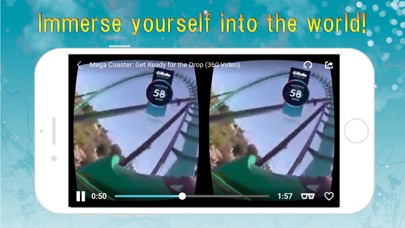
There is VR entertainment mode that can perform binocular display and head tracking with a gyro sensor. If you activate VR mode and wear a headset (Cardboard, Gear VR, other VR glasses, etc.), you can experience an immersive viewing!
・Zoom
Enable to zoom during playback
・Playlist
Enable to create playlist
How to use
□ Switching the view mode to stereo and single mode
Tap the VR glasses icon to switch the view mode.
□ Reset rotation
Touch the target-shaped icon to reset the rotation while playing 360 ° video
□ Zoom
Pinch on the screen.
□ Playlist
Tap the heart icon or tap the share button and select save to the play list
About
VRTube is a YouTube video streaming app. There is no function to download video. It should be online when playing (it does not support to download and offline playback).
Notes
Due to a bug in iOS, the video sometimes does not proceed from 0 seconds on a black screen, but in that case, the video will start playing by tapping the seek bar.
Remove Ads (monthly plan)
Subscribing to the "No Ads — Monthly" in-app purchase turns off every ad in the app.
- Length: 1 month, renews automatically
- Price: shown on the purchase screen in the App Store (it depends on your country and currency)
- Payment is charged to your Apple ID when you confirm the purchase
- It renews at the same price unless you cancel at least 24 hours before the period ends
- Cancel any time in Settings > Apple ID > Subscriptions on your device
- If you bought the one-time ad removal before, you keep it. There's nothing more to pay
Terms of Use: https://www.apple.com/legal/internet-services/itunes/dev/stdeula/
Privacy Policy: https://ada-software.com/privacy-policy-vrtube/