** Do you want to boost your media sound volume? This app allows you to increase the volume of your music, video, audio, audiobooks, and voice files. Boost the volume by up to 1000%!
** The Powerful Bass Booster amplifies your bass and offers brilliant sound quality!
** The Media Converter converts your audio and video files to nearly any major video or audio format!
Key Features:
* Deep Bass Booster boosts bass by up to 200%.
* Boost audio and video volume by up to 1000%.
* Boost the volume of all media, including audio and video files.
* Boost nearly any audio/video format: MP3, M4A, AAC, AIFF, mp4, MKV, MOV, AVI, etc.
* Lower or mute the sound of your audio/video file.
* Supports batch mode.
* Convert nearly any video file to:
MP4, MOV, GIF, OGG, WEBM, MKV (H.264), MKV (H.265), MPG, WMV, M2TS, AVI
* Convert nearly any audio file to:
MP3, M4A, AAC, OGG, WAV, FLAC, WMA, AIFF, CAF, ADX, OPUS
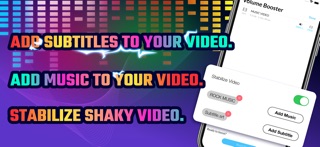
* Stabilize shaky videos.
* Add/Embed Music in your Video.
* Add/Embed Subtitles in your Video.
* Quick and Easy to Use.
* Import audio/video files from Photos Library, Music Library, iCloud, or iTunes File Sharing.
* Supported input formats include:
MP4, MOV, GIF, OGG, WEBM, MKV (H.264), MKV (H.265), MPG, WMV, M2TS, AVI, MP3, M4A, AAC, OGG, WAV, FLAC, WMA, AIFF, CAF, ADX, OPUS, etc.
* Export/Share your converted media files to other apps.
* AirDrop your converted files to other Apple devices.
* Save your converted files to a local library or iCloud.
* In-app File Browser: Search, Preview, Rename, and Delete your audio and video files. Sort by Name, Date, and Duration.
* The built-in universal media player can play any audio or video format:
MP4,AVI,MKV,RMVB,FLV,WMV,WAV,3GP,MOV,SWF,MPEG,MPG,VOB,M4V,RM,M2TS,ASF,WEBM,DAT,TS,ASX,MP3,F4V,OGV,DIVX,DV,GXF,M2P,MPEG1,MPEG2,MPEG4,MTS,MXF,OGM,QT,WM
How to Boost Volume or Convert to Other Formats:
1. Tap the '+' button (at top left corner) to import your audio/video file.
2. After you import the file, tap the file in the list view and select "Boost Volume".
3. Choose the Volume Level and Output Format you want.
4. For video conversion, you can also choose to stabilize your video, add music to your output video, or add subtitles to your output video.
5. Finally, tap the "Boost Now" button to start the conversion. Once the conversion is complete, you can preview (playback) your boosted files or share them to another app or device easily.
Subscription:
Payment will be charged to iTunes Account at confirmation of purchase.
Subscription automatically renews unless auto-renew is turned off at least 24-hours before the end of the current period.
Account will be charged for renewal within 24-hours prior to the end of the current period. The cost depends on the selected plan.
Subscriptions may be managed by the user and auto-renewal may be turned off by going to the user's Account Settings after purchase.
Any unused portion of the free trial will be forfeited when the user purchases a subscription.
Terms: http://www.9bestapp.com/terms/
Privacy: http://www.9bestapp.com/resources/privacy-policy.html