Voice Recorder, Voice Memos ® — a powerful voice recorder for iPhone, iPad and Apple Watch, with Spatial Audio, Apple Intelligence and fully on-device AI. Record in immersive Spatial Audio, get smart titles, categories, tags and summaries, turn speech into text without an internet connection, and keep everything safe in iCloud. Private by design.
SPATIAL AUDIO RECORDING
• Capture immersive Spatial Audio with your iPhone's microphones
• Great for interviews, meetings, concerts and ambience
APPLE INTELLIGENCE
• Smart titles: each recording is named after what was said. Edit any title, or ask for a new one
• Smart Categories: Meeting, Interview, Lecture, Call, Idea, Note and more, with an icon in History and a one-tap filter
• Automatic tags, and suggested tags you add with a tap
• Summaries: the key points of a long recording in seconds
• 100% on-device — nothing is sent to a server
TRANSCRIPTION
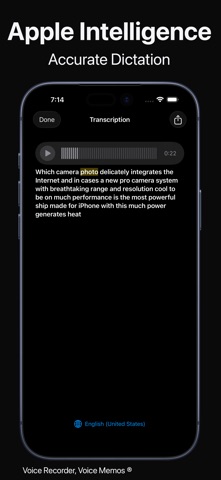
• On-device speech to text, even offline
• Follow along as the transcript is highlighted during playback
• Automatic transcription of new recordings with Auto Tag
• Translate transcripts with Apple Translate
• Noise cancellation for a clearer voice
LIVE ACTIVITY
• Follow your recording on the Lock Screen and in the Dynamic Island: live timer, waveform and a paused indicator
• Also in StandBy, the Apple Watch Smart Stack and CarPlay
APPLE WATCH
• Record right on your wrist — recordings are sent to your iPhone automatically
• Browse and play your iPhone recordings on your watch
RECORDING
• One tap to record, one tap to stop and save
• Stereo or mono, with external and studio microphones
• Keeps recording in the background; unlimited recording with a subscription
• Timer, automatic file names, and the size, length and date of each recording
EDITING AND PLAYBACK
• Trim recordings with the built-in editor
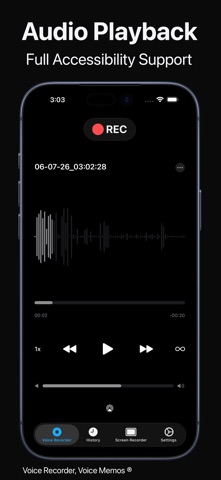
• Playback speed control and AirPlay
• Voice changer with fun effects
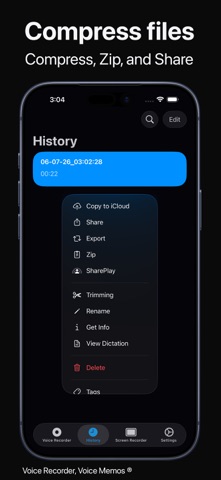
• Export to MP3, AAC, M4A, WAV and CAF
ORGANIZE YOUR LIBRARY
• Choose a category yourself for any recording
• Automatic and manual tags with color labels, managed in one place
• Search by title, tag or transcript; sort by name, date, length or size
• Select many recordings to share, tag, categorize, back up or delete
• Recently Deleted lets you restore removed recordings
• Protect your recordings with Face ID or Touch ID
ICLOUD AND SHARING
• Optional automatic backup to iCloud Drive; your library syncs with iCloud
• Share by email, Messages, AirDrop, WhatsApp and more, or use the Files app
• Transfer recordings to a Mac or PC with Finder file sharing
SCREEN RECORDING
• Record your screen (unlimited with a subscription)
SIRI AND SHORTCUTS
• Ask Siri to start, pause, resume or stop a recording, play your last recording, open your last transcript, pause or resume playback, or start a screen recording — hands-free
• Use these actions in your own shortcuts in the Shortcuts app
APPLE ECOSYSTEM
• iMessage app and Home Screen widgets
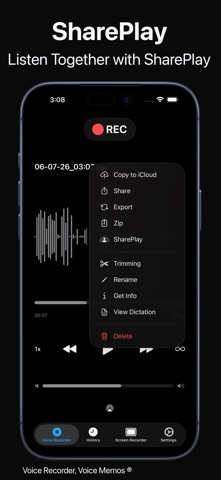
• SharePlay: listen to memos together
• Designed for iPhone, iPad and iPhone Duo
• VoiceOver and Dynamic Type support
PLANS
• Subscribe monthly or yearly — try Yearly free first
• Or choose Lifetime: pay once and keep every feature forever
• One purchase unlocks the app on iPhone, iPad, Mac and Apple Vision Pro
PRICE AND TERMS
Lifetime is a one-time purchase and does not renew. For subscriptions, payment is charged to your Apple Account at confirmation of purchase. The subscription renews automatically unless auto-renew is turned off at least 24 hours before the end of the current period. Your account is charged for renewal within 24 hours before the end of the current period. Manage or cancel your subscription at any time in your Apple Account settings or in the app's Settings. Any unused portion of a free trial is forfeited when you purchase a subscription.
Terms of Use: https://voicerecordervoicememos.app/terms
Privacy Policy: https://voicerecordervoicememos.app/privacy