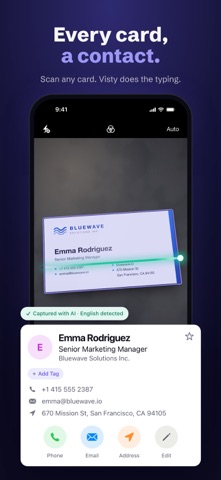
Scan business cards with AI and get perfect contacts in seconds. Visty reads every field — name, phone, email, company — on cards in English, Chinese, Japanese, Korean, Vietnamese and the major European languages, lets you fix anything in one tap, and exports everywhere: iPhone Contacts, CSV, vCard or your CRM.
Whether you call it a business card or a visiting card, the problem is the same: paper gets lost, and your network shouldn't. Visty turns every card you collect — at conferences, trade shows, client meetings or exhibitions — into an organized, exportable contact.
SCAN BUSINESS CARDS WITH AI
• AI Card Scanner — point your camera and every field is recognized and placed correctly, whether the card is in Latin script, Chinese, Japanese or Korean.
• One-Tap Corrections — if the AI ever gets a field wrong, change it instantly. You stay in control.
• Batch Scanning — scan a whole stack of cards in a row. Built for trade shows and conference season.
• Import from Photos — digitize cards you photographed weeks ago.
• Front and Back — add the back of a card when it carries more details.
• Live Text — tap a phone number or email on the card photo to use it, or copy any text.
SIRI, SPOTLIGHT & ON-DEVICE READING
• Ask Siri — "Find Mark in Visty" opens the right card without opening the app first.
• Spotlight Search — saved cards turn up in iPhone search, alongside your apps and messages.
• Read on your iPhone — on supported devices, cards are recognized on-device instead of being sent to a server to be interpreted.
• Shortcuts — drop Visty's scan and search actions straight into your own automations.
EXPORT & ORGANIZE WITHOUT LOCK-IN
• Export as CSV or vCard — ready for Excel, Google Contacts, Outlook and any CRM.
• Save to iPhone Contacts in one tap — a single card or a whole folder.
• Folder Organization — group contacts by event, company or client.
• Smart Search — find anyone by name, job title or company in seconds.
• Quick Actions — call, text, email or open an address in Maps straight from the card.
• Your data stays yours: everything you scan is exportable, always.
CREATE & SHARE YOUR DIGITAL BUSINESS CARD
• Digital Card Maker — design a professional digital business card with customizable templates, colors and layouts.
• Share as a QR code, vCard or image — no printing, and no app needed for the recipient.
• Multiple Profiles — separate cards for work, events or personal use.
WHY PROFESSIONALS CHOOSE VISTY
Visty helps professionals capture leads at events, organize their network and export contacts to the tools they already use. From scanning a single business card to digitizing a conference's worth of leads, Visty keeps every connection organized and accessible.
Download Visty — the AI business card scanner that respects your time and your data.
Privacy Policy: https://www.visty.app/privacy-policy
Terms of Use: https://www.visty.app/terms-of-use
Support: support@visty.app